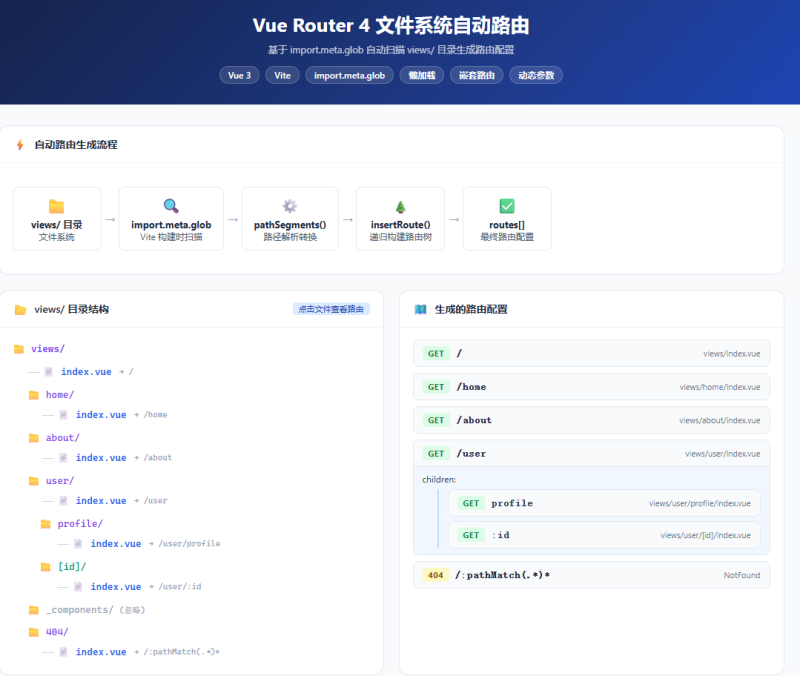









📌 适合人群:使用 Vue3 + Vite 的开发者,希望像 Nuxt / Next.js 一样实现”文件即路由”。
关键词:Vue Router 4、自动路由、动态路由、import.meta.glob、文件系统路由、Vite
一、为什么需要自动路由?
在传统 Vue 项目中,每次新增一个页面,都要手动在 router/index.js 里写一条路由配置:
// 传统方式:手动维护,容易遗漏
const routes = [
  { path: '/', component: () => import('@/views/index.vue') },
  { path: '/home', component: () => import('@/views/home/index.vue') },
  { path: '/user', component: () => import('@/views/user/index.vue') },
  { path: '/user/profile', component: () => import('@/views/user/profile/index.vue') },
  // 每增加一个页面,这里就多一行...
]随着页面增多,这份配置会越来越臃肿,且极易出现路径写错、忘记注册的问题。
自动路由的核心思路是:文件系统即路由。
只要在 views/ 下创建文件夹并放入 index.vue,路由就自动存在,无需任何额外配置。
二、目录约定
src/
├── views/
│   ├── index.vue              → /
│   ├── home/
│   │   └── index.vue          → /home
│   ├── about/
│   │   └── index.vue          → /about
│   ├── user/
│   │   ├── index.vue          → /user
│   │   └── profile/
│   │       └── index.vue      → /user/profile(children)
│   └── 404/
│       └── index.vue          → 自动注册为 404 页
└── router/
    ├── index.js               → 路由入口
    └── auto-routes.js         → 自动扫描核心文件
约定规则
| 文件路径 | 生成路由 path | 说明 |
|---|---|---|
views/index.vue | / | 根路由 |
views/about/index.vue | /about | 一级路由 |
views/user/index.vue | /user | 一级路由 |
views/user/profile/index.vue | profile(user 的 children) | 嵌套子路由 |
views/[id]/index.vue | /:id | 动态参数路由(进阶版) |
views/_components/ | 忽略 | 下划线目录不生成路由 |
三、核心实现(基础版)
3.1 auto-routes.js 完整代码
/**
 * auto-routes.js
 * 自动扫描 views/ 目录,根据文件夹结构与 index.vue 生成 Vue Router 路由配置
 */

// 1. 用 import.meta.glob 扫描所有 index.vue 文件(懒加载)
const modules = import.meta.glob('../views/**/index.vue')

// 2. 将文件路径转为路由段数组
//    '../views/user/profile/index.vue' → ['user', 'profile']
function pathSegments(filePath) {
  return filePath
    .replace(/^\.\.\/views\//, '')   // 去除前缀
    .replace(/\/index\.vue$/, '')    // 去除 /index.vue
    .split('/')
    .filter(Boolean)                 // 过滤空串(根路由情况)
}

// 3. 在路由树中递归插入节点
function insertRoute(routes, segments, loader) {
  if (segments.length === 0) {
    // views/index.vue → 根路由 /
    routes.push({ path: '/', component: loader, meta: { title: 'Home' } })
    return
  }

  const [first, ...rest] = segments

  // 查找是否已有同名父路由
  let parent = routes.find(r => r._segment === first)

  if (!parent) {
    parent = {
      _segment: first,          // 内部标记,清理时删除
      path: '/' + first,
      component: null,          // 遇到 index.vue 时填充
      children: [],
    }
    routes.push(parent)
  }

  if (rest.length === 0) {
    // 当前路径对应该文件夹的 index.vue
    parent.component = loader
  } else {
    // 递归处理子路由
    insertRoute(parent.children, rest, loader)
  }
}

// 4. 清理内部标记、修正子路由 path
function cleanRoutes(routes) {
  return routes
    .filter(r => r.component !== null)
    .map(r => {
      const { _segment, children, ...rest } = r
      const cleaned = { ...rest }
      if (children && children.length > 0) {
        const cleanedChildren = cleanRoutes(
          children.map(child => ({
            ...child,
            path: child.path.replace(/^\/[^/]+\//, ''), // '/user/profile' → 'profile'
          }))
        )
        if (cleanedChildren.length > 0) cleaned.children = cleanedChildren
      }
      return cleaned
    })
}

// 5. 主函数:生成完整路由数组
export function generateRoutes() {
  const routes = []

  for (const [filePath, loader] of Object.entries(modules)) {
    const segments = pathSegments(filePath)
    insertRoute(routes, segments, loader)
  }

  const cleanedRoutes = cleanRoutes(routes)

  // 自动注入 404 兜底路由
  cleanedRoutes.push({
    path: '/:pathMatch(.*)*',
    name: 'NotFound',
    component: () => import('../views/404/index.vue').catch(
      () => ({ template: '<div style="text-align:center;padding:2rem"><h2>404 - 页面不存在</h2></div>' })
    ),
  })

  // 开发环境打印路由表
  if (import.meta.env.DEV) {
    console.group('[auto-routes] 自动生成路由表')
    printRoutes(cleanedRoutes)
    console.groupEnd()
  }

  return cleanedRoutes
}

function printRoutes(routes, depth = 0) {
  const indent = '  '.repeat(depth)
  for (const r of routes) {
    console.log(`${indent}${r.path}`)
    if (r.children) printRoutes(r.children, depth + 1)
  }
}
3.2 router/index.js — 引入并使用
import { createRouter, createWebHistory } from 'vue-router'
import { generateRoutes } from './auto-routes.js'

const router = createRouter({
  history: createWebHistory(import.meta.env.BASE_URL),
  routes: generateRoutes(),
  scrollBehavior(to, from, savedPosition) {
    if (savedPosition) return savedPosition
    return { top: 0, behavior: 'smooth' }
  },
})

// 全局守卫:自动设置页面标题
router.beforeEach((to, from, next) => {
  if (to.meta?.title) document.title = `${to.meta.title} | MyApp`
  next()
})

export default router
四、技术原理深度解析
4.1 import.meta.glob — Vite 的文件扫描利器
// 懒加载(返回函数,调用时才 import)
const modules = import.meta.glob('../views/**/index.vue')
// 结果示例:
// {
//   '../views/index.vue': () => import('../views/index.vue'),
//   '../views/home/index.vue': () => import('../views/home/index.vue'),
//   '../views/user/index.vue': () => import('../views/user/index.vue'),
//   '../views/user/profile/index.vue': () => import('../views/user/profile/index.vue'),
// }

// 立即加载(eager 模式,适合数量少的场景)
const eagerModules = import.meta.glob('../views/**/index.vue', { eager: true })关键点:
import.meta.glob是 Vite 的构建时特性,在编译阶段就确定了所有匹配文件,最终会被转换成多个import()调用,完全支持 Tree Shaking 与代码分割。
4.2 懒加载的实现原理
Vue Router 的 component 字段直接接受返回 Promise 的函数(即动态 import()),因此 import.meta.glob 返回的 loader 函数可以直接作为组件:
// import.meta.glob 返回的 loader 就是:
// () => import('../views/home/index.vue')
// 等价于 Vue Router 期望的懒加载格式,可以直接使用
routes.push({
  path: '/home',
  component: modules['../views/home/index.vue'], // 直接赋值即可
})
4.3 嵌套路由的构建逻辑
核心是路径段数组的递归处理:
文件:views/user/profile/index.vue
     ↓
路径段:['user', 'profile']
     ↓
第一次递归:在根路由中找 _segment === 'user'
  ├── 找到 → 继续递归 rest = ['profile']
  └── 找不到 → 创建 { _segment: 'user', path: '/user', children: [] }
     ↓
第二次递归:在 user.children 中找 _segment === 'profile'
  ├── rest === [] → 说明这就是目标,设置 component
  └── 创建 { _segment: 'profile', path: '/user/profile', component: loader }
最终清理时,将子路由 path 从绝对路径 /user/profile 改为相对路径 profile(Vue Router 嵌套路由规范要求)。
五、进阶版:支持动态参数 [id] 与元信息
5.1 动态参数路由约定
views/
├── user/
│   └── [id]/
│       └── index.vue     →  /user/:id
└── [...slug]/
    └── index.vue         →  /:slug(.*)*   (catch-all)
5.2 路径转换函数
function toRoutePath(segment) {
  return segment
    .replace(/^\[\.\.\.(.+)\]$/, ':$1(.*)*')  // [...slug] → :slug(.*)*
    .replace(/^\[(.+)\]$/, ':$1')             // [id]      → :id
}

function pathSegments(filePath) {
  return filePath
    .replace(/^\.\.\/views\//, '')
    .replace(/\/index\.vue$/, '')
    .split('/')
    .filter(seg => seg && !seg.startsWith('_'))  // 下划线目录忽略
    .map(toRoutePath)                            // 转换动态参数
}
5.3 <route> 自定义块注入元信息
在 .vue 文件中添加 <route> 块,自动读取路由名称、meta 等配置:
<!-- views/user/[id]/index.vue -->
<route>
{
  "name": "UserDetail",
  "meta": {
    "title": "用户详情",
    "requiresAuth": true,
    "keepAlive": false
  }
}
</route>

<template>
  <div>用户 {{ $route.params.id }} 的详情页</div>
</template>
读取方式:
const routeMeta = import.meta.glob('../views/**/index.vue', {
  query: '?vue&type=route&lang.json',
  eager: true,
  import: 'default',
})注意:
<route>自定义块需要配合vite-plugin-vue的自定义块解析,或使用unplugin-vue-router插件直接支持。
六、使用 unplugin-vue-router(推荐生产方案)
如果不想手写扫描逻辑,可直接使用官方推荐的 unplugin-vue-router 插件,它是 Vue Router 官方团队出品的零配置自动路由方案。
6.1 安装
npm install unplugin-vue-router6.2 Vite 配置
// vite.config.js
import { defineConfig } from 'vite'
import vue from '@vitejs/plugin-vue'
import VueRouter from 'unplugin-vue-router/vite'

export default defineConfig({
  plugins: [
    VueRouter({
      routesFolder: 'src/views',   // 扫描目录
      dts: 'src/typed-router.d.ts', // 生成 TypeScript 类型定义
    }),
    vue(), // VueRouter 必须在 vue() 之前
  ],
})
6.3 路由配置
// router/index.js
import { createRouter, createWebHistory } from 'vue-router'
import { routes, handleHotUpdate } from 'vue-router/auto-routes'

const router = createRouter({
  history: createWebHistory(),
  routes,
})

// 开发环境支持 HMR 热更新路由
if (import.meta.hot) {
  handleHotUpdate(router)
}

export default router
6.4 unplugin-vue-router 目录约定对照
| 文件路径 | 生成路由 |
|---|---|
views/index.vue | / |
views/users.vue | /users |
views/users/[id].vue | /users/:id |
views/users/[id]/posts.vue | /users/:id/posts |
views/[...path].vue | /:path(.*) |
views/(group)/about.vue | /about(括号表示路由分组,不影响 path) |
七、自动路由与手动路由的对比
| 维度 | 手动路由 | 自动路由(文件系统路由) |
|---|---|---|
| 维护成本 | 高,每次新增页面都要改配置 | 低,创建文件即生效 |
| 出错风险 | 容易写错路径或忘记注册 | 路径由文件系统保证,不会出错 |
| 可读性 | 集中在一个文件,一目了然 | 分散在目录结构中,需熟悉约定 |
| 灵活性 | 高,可完全自定义 | 受约定限制,复杂场景需补充配置 |
| TypeScript 支持 | 无(需手写类型) | unplugin-vue-router 自动生成类型 |
| 适合场景 | 路由较少的小项目 | 中大型项目,页面数量多 |
八、常见问题排查
Q1:新增文件后路由没有生效
原因:import.meta.glob 在构建阶段确定文件列表,开发环境下 Vite 会监听文件变化并触发 HMR,但路由配置不会自动重新加载。
解决:
- 方案一:重启 Vite 开发服务器(最简单)
- 方案二:使用
unplugin-vue-router,它原生支持 HMR 热更新路由
Q2:子路由无法匹配,父组件没有 <router-view>
原因:嵌套路由要求父路由的组件中必须有 <router-view> 占位符。
解决:在父路由对应的 index.vue 中添加:
<!-- views/user/index.vue -->
<template>
  <div>
    <h2>用户中心</h2>
    <!-- 子路由在这里渲染 -->
    <router-view />
  </div>
</template>Q3:views/user/index.vue 不存在,但有子页面
此时 user 目录没有 index.vue,会导致父路由 component: null,子路由无法嵌套。
解决:为每个有子路由的目录都创建 index.vue(哪怕是一个空壳布局组件):
<!-- views/user/index.vue(布局壳) -->
<template>
  <router-view />
</template>Q4:import.meta.glob 路径必须是字面量字符串
原因:Vite 在编译时静态分析 glob 模式,不支持动态拼接变量。
// ❌ 错误:不能使用变量
const dir = '../views'
const modules = import.meta.glob(`${dir}/**/index.vue`)

// ✅ 正确:必须是字面量字符串
const modules = import.meta.glob('../views/**/index.vue')Q5:[id] 动态路由与静态路由同时存在时的优先级
Vue Router 4 中,静态路由优先级高于动态路由,无需额外配置:
views/user/new/index.vue    → /user/new    (静态,优先匹配)
views/user/[id]/index.vue   → /user/:id   (动态,当静态未匹配时生效)
九、完整项目结构示例
src/
├── views/
│   ├── index.vue              # 首页 /
│   ├── home/
│   │   └── index.vue          # /home
│   ├── about/
│   │   └── index.vue          # /about
│   ├── user/
│   │   ├── index.vue          # /user(含 <router-view>)
│   │   ├── profile/
│   │   │   └── index.vue      # /user 的 children: profile
│   │   └── [id]/
│   │       └── index.vue      # /user/:id
│   ├── 404/
│   │   └── index.vue          # 404 页(自动注册)
│   └── _components/           # 下划线目录,不生成路由
│       └── MyWidget.vue
├── router/
│   ├── index.js               # 路由入口
│   └── auto-routes.js         # 自动扫描核心(本文实现)
├── App.vue
└── main.js
十、总结
本文实现了一套基于 Vite import.meta.glob 的 Vue Router 4 自动路由方案,核心要点:
import.meta.glob在构建时静态扫描文件,返回懒加载函数数组- 递归路径段解析,将文件系统树映射为路由嵌套树
- 子路由 path 修正:绝对路径 → 相对路径(Vue Router 嵌套路由规范)
- 动态参数支持:
[id]→:id,[...slug]→:slug(.*)* - 404 自动注入 + 开发环境路由表打印,开发体验友好
- 生产方案推荐
unplugin-vue-router,零配置 + TypeScript 类型支持
只需在 views/ 目录下按约定创建文件夹和 index.vue,路由即刻生效,告别手动维护路由配置的繁琐!
📢 觉得有帮助?欢迎点赞 + 收藏!
💬 评论区欢迎留言,问题随时解答~
🔔 关注博主,持续更新 Vue3 + Vite 实战系列






暂无评论内容