1. 基础概念与架构
1.1 什么是 Electron
Electron 是一个使用 Web 技术(HTML、CSS、JavaScript)构建跨平台桌面应用的框架,由 GitHub 开发并维护。
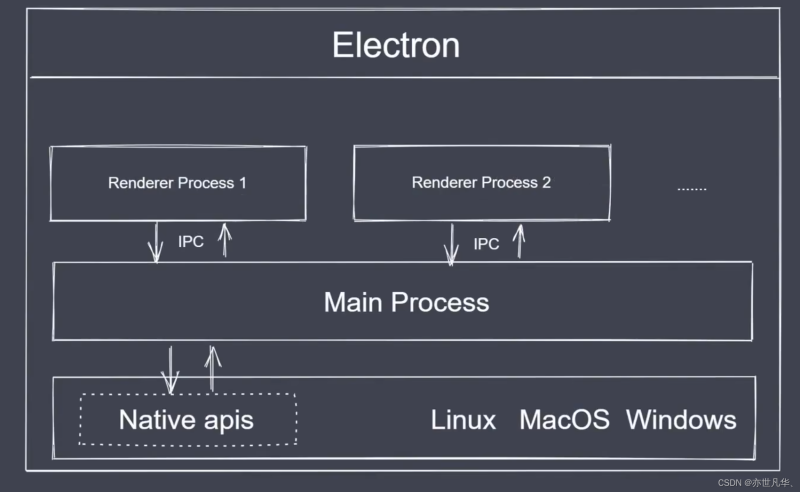
1.2 核心架构
┌─────────────────────────────────────────────────────────┐
│                      Electron 应用                       │
├─────────────────────────────────────────────────────────┤
│  ┌─────────────────┐         ┌─────────────────────┐    │
│  │   主进程 Main    │◄──────►│  渲染进程 Renderer   │    │
│  │   (Node.js)     │  IPC    │  (Chromium + Vue)   │    │
│  └────────┬────────┘         └──────────┬──────────┘    │
│           │                              │               │
│  ┌────────▼────────┐            ┌────────▼──────────┐   │
│  │  系统 API 访问   │            │   Web APIs 访问   │   │
│  │  - 窗口管理      │            │   - DOM           │   │
│  │  - 菜单栏        │            │   - Fetch/AJAX    │   │
│  │  - 托盘图标      │            │   - Canvas        │   │
│  │  - 系统通知      │            │                   │   │
│  │  - 文件系统      │            └───────────────────┘   │
│  └─────────────────┘                                    │
└─────────────────────────────────────────────────────────┘
1.3 主进程 vs 渲染进程
特性 主进程 (Main Process) 渲染进程 (Renderer Process) 运行环境 Node.js Chromium 数量 唯一 多个(每个窗口一个) 职责 应用生命周期、窗口管理、系统交互 UI 渲染、用户交互 直接访问 文件系统、操作系统 API 受限(沙箱安全) 通信方式 IPC(进程间通信) preload 脚本暴露 API
1.4 Electron 工作流程
1. 启动应用
   └─→ main.js 执行,创建 BrowserWindow

2. 加载页面
   └─→ 渲染进程加载 Vue 应用的 index.html

3. 用户交互
   └─→ 渲染进程 ←→ IPC ←→ 主进程

4. 应用退出
   └─→ 主进程关闭所有窗口,终止应用
2. 技术栈对比与选型
2.1 桌面框架对比
框架 开发语言 渲染引擎 包体积 性能 生态 Electron JS/TS Chromium ~150MB 中等 ⭐⭐⭐⭐⭐ Tauri Rust+Web 系统 WebView ~10MB 高 ⭐⭐⭐ NW.js JS/TS Chromium ~150MB 中等 ⭐⭐⭐ PyQt Python Qt ~50MB 高 ⭐⭐⭐ Flutter Dart Skia ~20MB 高 ⭐⭐⭐
2.2 前端框架选型
框架 特点 适用场景 学习曲线 Vue 3 简洁易用、Composition API 中小型应用 ⭐⭐ React 生态丰富、Hooks 大型应用 ⭐⭐⭐ Angular 企业级、TypeScript 企业应用 ⭐⭐⭐⭐
2.3 推荐技术组合
组合 优势 适用项目 Electron + Vue 3 快速开发、Vue 生态 GameBox、游戏工具 Electron + React 组件化强 复杂应用 Tauri + Vue 3 轻量高性能 小工具、效率软件
3. 环境准备
3.1 系统要求
要求 说明 操作系统 Windows 10+ / macOS 10.15+ / Ubuntu 18.04+ 内存 建议 8GB+ 磁盘 预留 10GB+ Node.js 18.x LTS 或 20.x LTS npm/yarn/pnpm 最新稳定版
3.2 安装 Node.js
# Windows: 使用 nvm-windows
# 下载: https://github.com/coreybutler/nvm-windows/releases

# Mac/Linux: 使用 nvm
curl -o- https://raw.githubusercontent.com/nvm-sh/nvm/v0.39.0/install.sh | bash

# 安装 Node.js 18 LTS
nvm install 18
nvm use 18
nvm alias default 18

# 验证安装
node --version   # v18.x.x
npm --version    # 9.x.x
3.3 安装 Electron 加速工具(可选)
# Windows 用户推荐安装 electron-builder 加速
npm install -g electron-builder

# 或使用国内镜像
npm config set electron_mirror https://npmmirror.com/mirrors/electron/
3.4 创建项目目录
# 创建项目目录
mkdir gamebox-app && cd gamebox-app

# 初始化 npm
npm init -y
4. 项目初始化
4.1 方式一:使用 electron-vite(推荐)
electron-vite 是专为 Electron + Vite 项目打造的脚手架工具。
# 创建 Electron + Vue 项目
npm create @quick-start/electron gamebox-app

# 交互式选择
? Select a framework: vue
? Select a variant: vue-ts
? Select UI framework: none

# 进入目录
cd gamebox-app
npm install
4.2 方式二:手动创建项目
# 创建目录结构
mkdir -p src/main src/renderer/src src/preload src/shared

# 目录说明
src/
├── main/           # Electron 主进程
│   ├── index.ts    # 主入口
│   └── ipc.ts      # IPC 处理
├── preload/        # 预加载脚本
│   └── index.ts
└── renderer/       # Vue 渲染进程
    ├── index.html
    └── src/
        ├── main.ts
        ├── App.vue
        ├── components/
        ├── views/
        └── stores/
4.3 完整 package.json
{
  "name": "gamebox-app",
  "version": "1.0.0",
  "description": "GameBox - 跨平台游戏盒子",
  "main": "./out/main/index.js",
  "author": "erick",
  "license": "MIT",
  "scripts": {
    "dev": "electron-vite dev",
    "build": "electron-vite build",
    "preview": "electron-vite preview",
    "postinstall": "electron-builder install-app-deps",
    "build:win": "npm run build && electron-builder --win",
    "build:mac": "npm run build && electron-builder --mac",
    "build:linux": "npm run build && electron-builder --linux"
  },
  "dependencies": {
    "@vueuse/core": "^10.7.0",
    "electron-store": "^8.1.0",
    "pinia": "^2.1.7",
    "vue": "^3.4.0",
    "vue-router": "^4.2.5"
  },
  "devDependencies": {
    "@electron-toolkit/preload": "^3.0.0",
    "@electron-toolkit/utils": "^3.0.0",
    "@vitejs/plugin-vue": "^5.0.0",
    "electron": "^28.0.0",
    "electron-builder": "^24.9.1",
    "electron-vite": "^2.0.0",
    "typescript": "^5.3.0",
    "vite": "^5.0.0",
    "vue-tsc": "^1.8.25"
  },
  "build": {
    "appId": "com.erick.gamebox",
    "productName": "GameBox",
    "directories": {
      "output": "dist"
    },
    "files": [
      "out/**/*"
    ],
    "win": {
      "target": [
        {
          "target": "nsis",
          "arch": ["x64"]
        }
      ],
      "icon": "build/icon.ico"
    },
    "mac": {
      "target": ["dmg"],
      "icon": "build/icon.icns"
    },
    "nsis": {
      "oneClick": false,
      "perMachine": false,
      "allowToChangeInstallationDirectory": true
    }
  }
}
4.4 初始化命令
# 安装依赖
npm install

# 如果安装慢,使用镜像
npm install --registry=https://registry.npmmirror.com
5. 核心配置详解
5.1 electron-vite 配置
// electron.vite.config.ts
import { resolve } from 'path'
import { defineConfig, externalizeDepsPlugin } from 'electron-vite'
import vue from '@vitejs/plugin-vue'

export default defineConfig({
  main: {
    plugins: [externalizeDepsPlugin()],
    build: {
      rollupOptions: {
        input: {
          index: resolve(__dirname, 'src/main/index.ts')
        }
      }
    }
  },
  preload: {
    plugins: [externalizeDepsPlugin()],
    build: {
      rollupOptions: {
        input: {
          index: resolve(__dirname, 'src/preload/index.ts')
        }
      }
    }
  },
  renderer: {
    root: resolve(__dirname, 'src/renderer'),
    build: {
      rollupOptions: {
        input: {
          index: resolve(__dirname, 'src/renderer/index.html')
        }
      }
    },
    plugins: [vue()]
  }
})
5.2 TypeScript 配置
// tsconfig.json
{
  "compilerOptions": {
    "target": "ES2020",
    "module": "ESNext",
    "moduleResolution": "bundler",
    "strict": true,
    "esModuleInterop": true,
    "skipLibCheck": true,
    "forceConsistentCasingInFileNames": true,
    "resolveJsonModule": true,
    "isolatedModules": true,
    "noEmit": true
  },
  "include": ["src/**/*.ts", "src/**/*.d.ts", "src/**/*.vue"],
  "references": [
    { "path": "./tsconfig.node.json" },
    { "path": "./tsconfig.web.json" }
  ]
}
// tsconfig.node.json(主进程 + preload)
{
"extends": "@electron-toolkit/tsconfig/tsconfig.node.json",
"compilerOptions": {
"composite": true,
"outDir": "./out",
"baseUrl": ".",
"paths": {
"@main/*": ["src/main/*"],
"@preload/*": ["src/preload/*"],
"@shared/*": ["src/shared/*"]
}
},
"include": [
"src/main/**/*.ts",
"src/preload/**/*.ts",
"src/shared/**/*.ts",
"electron.vite.config.ts"
]
}// tsconfig.web.json(渲染进程)
{
"extends": "@vue/tsconfig/tsconfig.dom.json",
"compilerOptions": {
"composite": true,
"outDir": "./out",
"baseUrl": ".",
"paths": {
"@renderer/*": ["src/renderer/src/*"]
}
},
"include": [
"src/renderer/src/**/*.ts",
"src/renderer/src/**/*.d.ts",
"src/renderer/src/**/*.vue",
"src/shared/**/*.ts"
]
}5.3 目录别名配置
// src/renderer/src/env.d.ts
/// <reference types="vite/client" />

declare module '*.vue' {
  import type { DefineComponent } from 'vue'
  const component: DefineComponent<{}, {}, any>
  export default component
}

interface Window {
  electron: {
    ipcRenderer: {
      send: (channel: string, ...args: any[]) => void
      on: (channel: string, func: (...args: any[]) => void) => void
      invoke: (channel: string, ...args: any[]) => Promise<any>
      removeAllListeners: (channel: string) => void
    }
  }
}
6. Vue 3 组件开发
6.1 入口文件
// src/renderer/src/main.ts
import { createApp } from 'vue'
import { createPinia } from 'pinia'
import router from './router'
import App from './App.vue'

import './assets/main.css'

const app = createApp(App)

app.use(createPinia())
app.use(router)

app.mount('#app')
6.2 App.vue 根组件
<!-- src/renderer/src/App.vue -->
<script setup lang="ts">
import { onMounted } from 'vue'
import { useGameStore } from './stores/game'
import { useAppStore } from './stores/app'

const gameStore = useGameStore()
const appStore = useAppStore()

onMounted(() => {
  // 初始化加载
  gameStore.fetchGames()

  // 监听 Electron 事件
  window.electron.ipcRenderer.on('game-launch', (_, gameId: string) => {
    gameStore.launchGame(gameId)
  })
})
</script>

<template>
  <div class="app-container">
    <!-- 侧边栏 -->
    <aside class="sidebar">
      <div class="logo">
        <img src="@renderer/assets/logo.png" alt="GameBox" />
        <span>GameBox</span>
      </div>

      <nav class="nav-menu">
        <router-link to="/" class="nav-item" active-class="active">
          <span class="icon">🎮</span>
          <span>全部游戏</span>
        </router-link>
        <router-link to="/categories" class="nav-item" active-class="active">
          <span class="icon">📂</span>
          <span>分类</span>
        </router-link>
        <router-link to="/favorites" class="nav-item" active-class="active">
          <span class="icon">⭐</span>
          <span>收藏</span>
        </router-link>
        <router-link to="/settings" class="nav-item" active-class="active">
          <span class="icon">⚙️</span>
          <span>设置</span>
        </router-link>
      </nav>

      <!-- 窗口控制按钮 -->
      <div class="window-controls">
        <button @click="appStore.minimize" title="最小化">─</button>
        <button @click="appStore.toggleMaximize" title="最大化">□</button>
        <button @click="appStore.close" class="close-btn" title="关闭">✕</button>
      </div>
    </aside>

    <!-- 主内容区 -->
    <main class="main-content">
      <router-view v-slot="{ Component }">
        <transition name="fade" mode="out-in">
          <component :is="Component" />
        </transition>
      </router-view>
    </main>
  </div>
</template>

<style scoped>
.app-container {
  display: flex;
  height: 100vh;
  background: #1a1a2e;
  color: #fff;
}

.sidebar {
  width: 240px;
  background: #16213e;
  display: flex;
  flex-direction: column;
  padding: 20px;
  border-right: 1px solid rgba(255,255,255,0.1);
}

.logo {
  display: flex;
  align-items: center;
  gap: 12px;
  padding-bottom: 20px;
  border-bottom: 1px solid rgba(255,255,255,0.1);
  margin-bottom: 20px;
}

.logo img {
  width: 40px;
  height: 40px;
}

.logo span {
  font-size: 20px;
  font-weight: bold;
  background: linear-gradient(135deg, #667eea 0%, #764ba2 100%);
  -webkit-background-clip: text;
  -webkit-text-fill-color: transparent;
}

.nav-menu {
  flex: 1;
}

.nav-item {
  display: flex;
  align-items: center;
  gap: 12px;
  padding: 12px 16px;
  margin-bottom: 8px;
  border-radius: 8px;
  color: #a0a0a0;
  text-decoration: none;
  transition: all 0.3s;
}

.nav-item:hover {
  background: rgba(255,255,255,0.1);
  color: #fff;
}

.nav-item.active {
  background: linear-gradient(135deg, #667eea 0%, #764ba2 100%);
  color: #fff;
}

.window-controls {
  display: flex;
  gap: 8px;
}

.window-controls button {
  flex: 1;
  padding: 8px;
  border: none;
  border-radius: 4px;
  background: rgba(255,255,255,0.1);
  color: #fff;
  cursor: pointer;
  transition: background 0.3s;
}

.window-controls button:hover {
  background: rgba(255,255,255,0.2);
}

.window-controls .close-btn:hover {
  background: #e74c3c;
}

.main-content {
  flex: 1;
  overflow-y: auto;
  padding: 24px;
}
</style>
6.3 路由配置
// src/renderer/src/router/index.ts
import { createRouter, createWebHashHistory } from 'vue-router'
import type { RouteRecordRaw } from 'vue-router'

const routes: RouteRecordRaw[] = [
  {
    path: '/',
    name: 'home',
    component: () => import('@renderer/views/HomeView.vue')
  },
  {
    path: '/categories',
    name: 'categories',
    component: () => import('@renderer/views/CategoriesView.vue')
  },
  {
    path: '/categories/:id',
    name: 'category',
    component: () => import('@renderer/views/CategoryView.vue')
  },
  {
    path: '/favorites',
    name: 'favorites',
    component: () => import('@renderer/views/FavoritesView.vue')
  },
  {
    path: '/settings',
    name: 'settings',
    component: () => import('@renderer/views/SettingsView.vue')
  },
  {
    path: '/game/:id',
    name: 'game-detail',
    component: () => import('@renderer/views/GameDetailView.vue')
  }
]

const router = createRouter({
  history: createWebHashHistory(),
  routes
})

export default router
6.4 Pinia 状态管理
// src/renderer/src/stores/game.ts
import { defineStore } from 'pinia'
import { ref, computed } from 'vue'
import type { Game } from '@shared/types'

export const useGameStore = defineStore('game', () => {
  // 状态
  const games = ref<Game[]>([])
  const loading = ref(false)
  const error = ref<string | null>(null)
  const favorites = ref<string[]>([])

  // 计算属性
  const totalGames = computed(() => games.value.length)
  const featuredGames = computed(() => games.value.filter(g => g.featured))
  const favoriteGames = computed(() =>
    games.value.filter(g => favorites.value.includes(g.id))
  )

  // 按分类筛选
  const getByCategory = (categoryId: string) =>
    games.value.filter(g => g.categoryId === categoryId)

  // 获取单个游戏
  const getById = (id: string) => games.value.find(g => g.id === id)

  // Actions
  async function fetchGames() {
    loading.value = true
    error.value = null

    try {
      // 从主进程获取数据(通过 IPC)
      const data = await window.electron.ipcRenderer.invoke('get-games')
      games.value = data
    } catch (e) {
      error.value = (e as Error).message
    } finally {
      loading.value = false
    }
  }

  async function launchGame(gameId: string) {
    const game = getById(gameId)
    if (!game) return

    try {
      // 调用主进程启动游戏
      await window.electron.ipcRenderer.invoke('launch-game', game.path)
    } catch (e) {
      error.value = (e as Error).message
    }
  }

  function toggleFavorite(gameId: string) {
    const index = favorites.value.indexOf(gameId)
    if (index > -1) {
      favorites.value.splice(index, 1)
    } else {
      favorites.value.push(gameId)
    }
    // 持久化到本地存储
    saveFavorites()
  }

  function saveFavorites() {
    localStorage.setItem('gamebox-favorites', JSON.stringify(favorites.value))
  }

  function loadFavorites() {
    const stored = localStorage.getItem('gamebox-favorites')
    if (stored) {
      favorites.value = JSON.parse(stored)
    }
  }

  return {
    games,
    loading,
    error,
    favorites,
    totalGames,
    featuredGames,
    favoriteGames,
    getByCategory,
    getById,
    fetchGames,
    launchGame,
    toggleFavorite,
    loadFavorites
  }
})
6.5 游戏卡片组件
<!-- src/renderer/src/components/GameCard.vue -->
<script setup lang="ts">
import { computed } from 'vue'
import { useGameStore } from '@renderer/stores/game'
import type { Game } from '@shared/types'

const props = defineProps<{
  game: Game
}>()

const emit = defineEmits<{
  (e: 'launch', game: Game): void
  (e: 'favorite', gameId: string): void
}>()

const gameStore = useGameStore()

const isFavorite = computed(() =>
  gameStore.favorites.includes(props.game.id)
)

function handleLaunch() {
  emit('launch', props.game)
}

function handleFavorite() {
  emit('favorite', props.game.id)
}
</script>

<template>
  <div class="game-card" @click="handleLaunch">
    <!-- 游戏封面 -->
    <div class="cover-wrapper">
      <img :src="game.cover" :alt="game.name" class="cover" />
      <div class="overlay">
        <button class="play-btn">▶</button>
      </div>
      <span v-if="game.featured" class="badge featured">热门</span>
      <span v-if="game.new" class="badge new">新上架</span>
    </div>

    <!-- 游戏信息 -->
    <div class="info">
      <h3 class="title">{{ game.name }}</h3>
      <p class="category">{{ game.category }}</p>
      <div class="meta">
        <span class="rating">⭐ {{ game.rating }}</span>
        <button
          class="favorite-btn"
          :class="{ active: isFavorite }"
          @click.stop="handleFavorite"
        >
          {{ isFavorite ? '❤️' : '🤍' }}
        </button>
      </div>
    </div>
  </div>
</template>

<style scoped>
.game-card {
  background: #1e1e2f;
  border-radius: 12px;
  overflow: hidden;
  cursor: pointer;
  transition: transform 0.3s, box-shadow 0.3s;
}

.game-card:hover {
  transform: translateY(-4px);
  box-shadow: 0 12px 24px rgba(0,0,0,0.3);
}

.cover-wrapper {
  position: relative;
  aspect-ratio: 16/9;
}

.cover {
  width: 100%;
  height: 100%;
  object-fit: cover;
}

.overlay {
  position: absolute;
  inset: 0;
  background: rgba(0,0,0,0.6);
  display: flex;
  align-items: center;
  justify-content: center;
  opacity: 0;
  transition: opacity 0.3s;
}

.game-card:hover .overlay {
  opacity: 1;
}

.play-btn {
  width: 60px;
  height: 60px;
  border-radius: 50%;
  background: linear-gradient(135deg, #667eea, #764ba2);
  border: none;
  color: white;
  font-size: 24px;
  cursor: pointer;
  transition: transform 0.3s;
}

.play-btn:hover {
  transform: scale(1.1);
}

.badge {
  position: absolute;
  top: 8px;
  padding: 4px 8px;
  border-radius: 4px;
  font-size: 12px;
  font-weight: bold;
}

.badge.featured {
  left: 8px;
  background: #f39c12;
  color: #fff;
}

.badge.new {
  right: 8px;
  background: #27ae60;
  color: #fff;
}

.info {
  padding: 12px;
}

.title {
  font-size: 16px;
  font-weight: bold;
  margin-bottom: 4px;
  white-space: nowrap;
  overflow: hidden;
  text-overflow: ellipsis;
}

.category {
  font-size: 12px;
  color: #888;
  margin-bottom: 8px;
}

.meta {
  display: flex;
  justify-content: space-between;
  align-items: center;
}

.rating {
  font-size: 14px;
  color: #f1c40f;
}

.favorite-btn {
  background: none;
  border: none;
  font-size: 20px;
  cursor: pointer;
  transition: transform 0.2s;
}

.favorite-btn:hover {
  transform: scale(1.2);
}
</style>
7. Electron 主进程
7.1 主进程入口
// src/main/index.ts
import { app, shell, BrowserWindow, ipcMain, dialog } from 'electron'
import { join } from 'path'
import { electronApp, optimizer, is } from '@electron-toolkit/utils'
import { setupIpcHandlers } from './ipc'

let mainWindow: BrowserWindow | null = null

function createWindow(): void {
  // 创建浏览器窗口
  mainWindow = new BrowserWindow({
    width: 1200,
    height: 800,
    minWidth: 900,
    minHeight: 600,
    show: false,                    // 等待ready-to-show后再显示
    autoHideMenuBar: false,         // 显示菜单栏
    frame: true,                    // 使用系统窗口边框
    titleBarStyle: 'default',       // macOS 原生标题栏
    webPreferences: {
      preload: join(__dirname, '../preload/index.js'),
      sandbox: false,
      contextIsolation: true,        // 启用上下文隔离
      nodeIntegration: false,       // 禁用 Node.js
      webSecurity: true
    }
  })

  mainWindow.on('ready-to-show', () => {
    mainWindow?.show()
    console.log('✅ 主窗口已显示')
  })

  // 处理外部链接
  mainWindow.webContents.setWindowOpenHandler((details) => {
    shell.openExternal(details.url)
    return { action: 'deny' }
  })

  // 开发模式下加载本地 URL
  if (is.dev && process.env['ELECTRON_RENDERER_URL']) {
    mainWindow.loadURL(process.env['ELECTRON_RENDERER_URL'])
  } else {
    // 生产模式下加载打包后的文件
    mainWindow.loadFile(join(__dirname, '../renderer/index.html'))
  }

  // 打开 DevTools(仅开发模式)
  if (is.dev) {
    mainWindow.webContents.openDevTools()
  }
}

// 应用准备就绪
app.whenReady().then(() => {
  // 设置应用 ID(Windows)
  electronApp.setAppUserModelId('com.erick.gamebox')

  // 监听窗口创建(macOS)
  app.on('browser-window-created', (_, window) => {
    optimizer.watchWindowShortcuts(window)
  })

  // 设置 IPC 处理程序
  setupIpcHandlers()

  // 创建主窗口
  createWindow()

  // macOS 激活处理
  app.on('activate', () => {
    if (BrowserWindow.getAllWindows().length === 0) {
      createWindow()
    }
  })
})

// 窗口全部关闭(Windows/Linux)
app.on('window-all-closed', () => {
  if (process.platform !== 'darwin') {
    app.quit()
  }
})

// 退出前清理
app.on('before-quit', () => {
  console.log('👋 应用即将退出')
})
7.2 IPC 处理程序
// src/main/ipc.ts
import { ipcMain, shell, dialog, app } from 'electron'
import { exec } from 'child_process'
import { promisify } from 'util'
import * as fs from 'fs'
import * as path from 'path'
import Store from 'electron-store'

const execAsync = promisify(exec)

// 初始化配置存储
const store = new Store({
  name: 'gamebox-config',
  defaults: {
    games: [],
    settings: {
      theme: 'dark',
      language: 'zh-CN',
      autoLaunch: false
    }
  }
})

// 游戏数据
interface Game {
  id: string
  name: string
  path: string
  cover: string
  category: string
  categoryId: string
  rating: number
  featured: boolean
  new: boolean
}

// 模拟游戏数据(后续可替换为真实后端)
const mockGames: Game[] = [
  {
    id: '1',
    name: '我的世界',
    path: 'C:\\Games\\Minecraft\\Minecraft.exe',
    cover: 'https://example.com/minecraft.jpg',
    category: '沙盒建造',
    categoryId: 'sandbox',
    rating: 4.9,
    featured: true,
    new: false
  },
  {
    id: '2',
    name: '英雄联盟',
    path: 'C:\\Games\\League\\LeagueClient.exe',
    cover: 'https://example.com/lol.jpg',
    category: 'MOBA',
    categoryId: 'moba',
    rating: 4.7,
    featured: true,
    new: false
  },
  {
    id: '3',
    name: '原神',
    path: 'C:\\Games\\Genshin\\Genshin Impact.exe',
    cover: 'https://example.com/genshin.jpg',
    category: '角色扮演',
    categoryId: 'rpg',
    rating: 4.8,
    featured: false,
    new: true
  }
]

export function setupIpcHandlers(): void {
  console.log('📡 设置 IPC 处理程序')

  // ========== 游戏相关 ==========

  // 获取游戏列表
  ipcMain.handle('get-games', async () => {
    console.log('📋 获取游戏列表')
    return mockGames
  })

  // 获取单个游戏
  ipcMain.handle('get-game', async (_, id: string) => {
    return mockGames.find(g => g.id === id) || null
  })

  // 启动游戏
  ipcMain.handle('launch-game', async (_, gamePath: string) => {
    console.log(`🎮 启动游戏: ${gamePath}`)

    try {
      // 检查文件是否存在
      if (!fs.existsSync(gamePath)) {
        throw new Error(`游戏文件不存在: ${gamePath}`)
      }

      // 使用默认程序打开(相当于双击)
      await shell.openPath(gamePath)

      return { success: true }
    } catch (error) {
      console.error('启动游戏失败:', error)
      return { success: false, error: (error as Error).message }
    }
  })

  // 打开游戏所在目录
  ipcMain.handle('open-game-folder', async (_, gamePath: string) => {
    const folder = path.dirname(gamePath)
    await shell.openPath(folder)
  })

  // ========== 文件系统相关 ==========

  // 选择文件
  ipcMain.handle('select-file', async (_, options: {
    title?: string
    filters?: { name: string; extensions: string[] }[]
  }) => {
    const result = await dialog.showOpenDialog({
      title: options.title || '选择文件',
      properties: ['openFile'],
      filters: options.filters || [
        { name: '可执行文件', extensions: ['exe', 'app', 'sh'] },
        { name: '所有文件', extensions: ['*'] }
      ]
    })

    return result.canceled ? null : result.filePaths[0]
  })

  // 选择目录
  ipcMain.handle('select-directory', async () => {
    const result = await dialog.showOpenDialog({
      title: '选择游戏目录',
      properties: ['openDirectory']
    })

    return result.canceled ? null : result.filePaths[0]
  })

  // 扫描目录下的游戏
  ipcMain.handle('scan-games', async (_, folderPath: string) => {
    console.log(`🔍 扫描目录: ${folderPath}`)

    const games: Game[] = []
    const exeExtensions = ['.exe', '.app', '.sh']

    try {
      const files = fs.readdirSync(folderPath)

      for (const file of files) {
        const ext = path.extname(file).toLowerCase()
        if (exeExtensions.includes(ext)) {
          const fullPath = path.join(folderPath, file)
          games.push({
            id: Buffer.from(fullPath).toString('base64'),
            name: path.basename(file, ext),
            path: fullPath,
            cover: '',
            category: '未分类',
            categoryId: 'uncategorized',
            rating: 0,
            featured: false,
            new: false
          })
        }
      }

      return games
    } catch (error) {
      console.error('扫描失败:', error)
      return []
    }
  })

  // ========== 系统相关 ==========

  // 获取应用版本
  ipcMain.handle('get-app-version', () => {
    return app.getVersion()
  })

  // 获取系统信息
  ipcMain.handle('get-system-info', () => {
    return {
      platform: process.platform,
      arch: process.arch,
      version: process.getSystemVersion(),
      electron: process.versions.electron,
      node: process.versions.node,
      chrome: process.versions.chrome
    }
  })

  // 打开外部链接
  ipcMain.handle('open-external', async (_, url: string) => {
    await shell.openExternal(url)
  })

  // ========== 配置相关 ==========

  // 获取配置
  ipcMain.handle('get-config', (_, key: string) => {
    return store.get(key)
  })

  // 设置配置
  ipcMain.handle('set-config', (_, key: string, value: any) => {
    store.set(key, value)
    return true
  })

  // 打开开发者工具
  ipcMain.on('toggle-devtools', (event) => {
    const webContents = event.sender
    if (webContents.isDevToolsOpened()) {
      webContents.closeDevTools()
    } else {
      webContents.openDevTools()
    }
  })
}
8. IPC 通信机制
8.1 IPC 通信模式
┌─────────────────────────────────────────────────────────────┐
│                    IPC 通信架构                              │
├─────────────────────────────────────────────────────────────┤
│                                                             │
│   主进程 (Main)              预加载 (Preload)                 │
│   ┌───────────┐              ┌─────────────┐                │
│   │ ipcMain   │◄── invoke ───│ 暴露的 API  │                │
│   │ .handle() │              │   window.   │                │
│   └───────────┘              │  electron   │                │
│        ▲                     └──────┬──────┘                │
│        │ send()                    │                        │
│        │ on()                      │                        │
│        │                           ▼                        │
│   ┌───────────┐              ┌─────────────┐                │
│   │ ipcMain   │              │  渲染进程   │                │
│   │ .on()     │◄── send ─────│  Vue App    │                │
│   └───────────┘              └─────────────┘                │
│                                                             │
│   通信方式:                                                  │
│   ┌─────────┬──────────────┬─────────────────────────────┐   │
│   │ invoke  │ 异步双向      │ await invoke('channel')   │   │
│   ├─────────┼──────────────┼─────────────────────────────┤   │
│   │ send    │ 单向(主进程) │ ipcRenderer.send()         │   │
│   ├─────────┼──────────────┼─────────────────────────────┤   │
│   │ on      │ 监听         │ ipcRenderer.on()           │   │
│   └─────────┴──────────────┴─────────────────────────────┘   │
│                                                             │
└─────────────────────────────────────────────────────────────┘
8.2 Preload 脚本
// src/preload/index.ts
import { contextBridge, ipcRenderer } from 'electron'

// 暴露给渲染进程的 API
contextBridge.exposeInMainWorld('electron', {
  // ========== 游戏相关 ==========
  getGames: () => ipcRenderer.invoke('get-games'),
  getGame: (id: string) => ipcRenderer.invoke('get-game', id),
  launchGame: (path: string) => ipcRenderer.invoke('launch-game', path),
  openGameFolder: (path: string) => ipcRenderer.invoke('open-game-folder', path),

  // ========== 文件系统 ==========
  selectFile: (options?: {
    title?: string
    filters?: { name: string; extensions: string[] }[]
  }) => ipcRenderer.invoke('select-file', options || {}),
  selectDirectory: () => ipcRenderer.invoke('select-directory'),
  scanGames: (folder: string) => ipcRenderer.invoke('scan-games', folder),

  // ========== 系统相关 ==========
  getAppVersion: () => ipcRenderer.invoke('get-app-version'),
  getSystemInfo: () => ipcRenderer.invoke('get-system-info'),
  openExternal: (url: string) => ipcRenderer.invoke('open-external', url),

  // ========== 配置相关 ==========
  getConfig: (key: string) => ipcRenderer.invoke('get-config', key),
  setConfig: (key: string, value: any) => ipcRenderer.invoke('set-config', key, value),

  // ========== 事件监听 ==========
  on: (channel: string, callback: (...args: any[]) => void) => {
    // 安全检查:只允许白名单内的通道
    const validChannels = ['game-launch', 'update-available', 'notification']
    if (validChannels.includes(channel)) {
      ipcRenderer.on(channel, (_, ...args) => callback(...args))
    }
  },

  // 移除监听
  removeAllListeners: (channel: string) => {
    ipcRenderer.removeAllListeners(channel)
  }
})

// 类型声明(供 TypeScript 使用)
export interface ElectronAPI {
  getGames: () => Promise<Game[]>
  getGame: (id: string) => Promise<Game | null>
  launchGame: (path: string) => Promise<{ success: boolean; error?: string }>
  openGameFolder: (path: string) => Promise<void>
  selectFile: (options?: any) => Promise<string | null>
  selectDirectory: () => Promise<string | null>
  scanGames: (folder: string) => Promise<Game[]>
  getAppVersion: () => Promise<string>
  getSystemInfo: () => Promise<any>
  openExternal: (url: string) => Promise<void>
  getConfig: (key: string) => Promise<any>
  setConfig: (key: string, value: any) => Promise<boolean>
  on: (channel: string, callback: (...args: any[]) => void) => void
  removeAllListeners: (channel: string) => void
}

interface Game {
  id: string
  name: string
  path: string
  cover: string
  category: string
  categoryId: string
  rating: number
  featured: boolean
  new: boolean
}
8.3 渲染进程调用示例
<!-- 使用示例 -->
<script setup lang="ts">
import { ref, onMounted, onUnmounted } from 'vue'

const version = ref('')
const games = ref<any[]>([])

onMounted(async () => {
  // 方式1:invoke 调用(推荐)
  version.value = await window.electron.getAppVersion()
  games.value = await window.electron.getGames()

  // 方式2:监听事件
  window.electron.on('game-launch', (gameId: string) => {
    console.log('收到启动游戏事件:', gameId)
  })
})

onUnmounted(() => {
  // 清理监听
  window.electron.removeAllListeners('game-launch')
})

async function handleLaunchGame(path: string) {
  const result = await window.electron.launchGame(path)
  if (result.success) {
    console.log('游戏已启动')
  } else {
    console.error('启动失败:', result.error)
  }
}

async function handleSelectGame() {
  const filePath = await window.electron.selectFile({
    title: '选择游戏可执行文件',
    filters: [
      { name: '可执行文件', extensions: ['exe', 'app'] }
    ]
  })

  if (filePath) {
    console.log('选择的文件:', filePath)
  }
}
</script>
9. 系统集成
9.1 应用菜单
// src/main/menu.ts
import { app, Menu, shell, BrowserWindow, MenuItemConstructorOptions } from 'electron'

export function createApplicationMenu(mainWindow: BrowserWindow): Menu {
  const isMac = process.platform === 'darwin'

  const template: MenuItemConstructorOptions[] = [
    // macOS 特有应用菜单
    ...(isMac ? [{
      label: app.name,
      submenu: [
        { role: 'about' as const },
        { type: 'separator' as const },
        {
          label: '设置...',
          accelerator: 'Cmd+,',
          click: () => mainWindow.webContents.send('open-settings')
        },
        { type: 'separator' as const },
        { role: 'services' as const },
        { type: 'separator' as const },
        { role: 'hide' as const },
        { role: 'hideOthers' as const },
        { role: 'unhide' as const },
        { type: 'separator' as const },
        { role: 'quit' as const }
      ]
    }] : []),

    // 文件菜单
    {
      label: '文件',
      submenu: [
        {
          label: '添加游戏...',
          accelerator: 'CmdOrCtrl+O',
          click: () => mainWindow.webContents.send('add-game')
        },
        {
          label: '扫描游戏目录...',
          accelerator: 'CmdOrCtrl+Shift+O',
          click: () => mainWindow.webContents.send('scan-games')
        },
        { type: 'separator' },
        isMac ? { role: 'close' } : { role: 'quit' }
      ]
    },

    // 编辑菜单
    {
      label: '编辑',
      submenu: [
        { role: 'undo' },
        { role: 'redo' },
        { type: 'separator' },
        { role: 'cut' },
        { role: 'copy' },
        { role: 'paste' },
        ...(isMac ? [
          { role: 'pasteAndMatchStyle' as const },
          { role: 'delete' as const },
          { role: 'selectAll' as const }
        ] : [
          { role: 'delete' as const },
          { type: 'separator' as const },
          { role: 'selectAll' as const }
        ])
      ]
    },

    // 视图菜单
    {
      label: '视图',
      submenu: [
        { role: 'reload' },
        { role: 'forceReload' },
        { role: 'toggleDevTools' },
        { type: 'separator' },
        { role: 'resetZoom' },
        { role: 'zoomIn' },
        { role: 'zoomOut' },
        { type: 'separator' },
        { role: 'togglefullscreen' }
      ]
    },

    // 窗口菜单
    {
      label: '窗口',
      submenu: [
        { role: 'minimize' },
        { role: 'zoom' },
        ...(isMac ? [
          { type: 'separator' as const },
          { role: 'front' as const },
          { type: 'separator' as const },
          { role: 'window' as const }
        ] : [
          { role: 'close' as const }
        ])
      ]
    },

    // 帮助菜单
    {
      label: '帮助',
      submenu: [
        {
          label: '关于 GameBox',
          click: () => mainWindow.webContents.send('show-about')
        },
        { type: 'separator' },
        {
          label: '打开日志目录',
          click: async () => {
            const { shell } = require('electron')
            await shell.openPath(app.getPath('logs'))
          }
        }
      ]
    }
  ]

  return Menu.buildFromTemplate(template)
}
9.2 系统托盘
// src/main/tray.ts
import { app, Tray, Menu, nativeImage, BrowserWindow } from 'electron'
import { join } from 'path'

let tray: Tray | null = null

export function createTray(mainWindow: BrowserWindow): Tray {
  // 创建托盘图标(需要准备图标文件)
  const iconPath = join(__dirname, '../../resources/icon.png')
  const icon = nativeImage.createFromPath(iconPath)

  // 如果图标不存在,使用空白图标
  if (icon.isEmpty()) {
    // 创建一个 16x16 的空白图标作为占位符
    const placeholder = nativeImage.createEmpty()
    tray = new Tray(placeholder)
  } else {
    tray = new Tray(icon)
  }

  // 设置托盘提示文本
  tray.setToolTip('GameBox - 游戏盒子')

  // 创建右键菜单
  const contextMenu = Menu.buildFromTemplate([
    {
      label: '打开 GameBox',
      click: () => {
        mainWindow.show()
        mainWindow.focus()
      }
    },
    { type: 'separator' },
    {
      label: '最近游戏',
      submenu: [
        { label: '我的世界', click: () => launchGame('minecraft') },
        { label: '英雄联盟', click: () => launchGame('lol') },
        { label: '原神', click: () => launchGame('genshin') }
      ]
    },
    { type: 'separator' },
    {
      label: '设置',
      click: () => {
        mainWindow.show()
        mainWindow.webContents.send('open-settings')
      }
    },
    { type: 'separator' },
    {
      label: '退出',
      click: () => {
        app.quit()
      }
    }
  ])

  tray.setContextMenu(contextMenu)

  // 单击托盘图标显示窗口
  tray.on('click', () => {
    if (mainWindow.isVisible()) {
      mainWindow.hide()
    } else {
      mainWindow.show()
      mainWindow.focus()
    }
  })

  return tray
}

function launchGame(gameId: string): void {
  // 通过 IPC 通知主进程启动游戏
  console.log(`从托盘启动游戏: ${gameId}`)
}
9.3 窗口管理
// src/main/window.ts
import { BrowserWindow, screen } from 'electron'

// 保存窗口状态
interface WindowState {
  x: number
  y: number
  width: number
  height: number
  isMaximized: boolean
}

export function getWindowState(): WindowState {
  const { width, height } = screen.getPrimaryDisplay().workAreaSize

  return {
    x: Math.floor((width - 1200) / 2),
    y: Math.floor((height - 800) / 2),
    width: 1200,
    height: 800,
    isMaximized: false
  }
}

export function setupWindowControls(mainWindow: BrowserWindow): void {
  // 最小化
  function minimize(): void {
    mainWindow.minimize()
  }

  // 最大化/还原
  function toggleMaximize(): void {
    if (mainWindow.isMaximized()) {
      mainWindow.unmaximize()
    } else {
      mainWindow.maximize()
    }
  }

  // 关闭
  function close(): void {
    mainWindow.close()
  }

  // 导出给渲染进程使用
  mainWindow.webContents.on('ipc-message', (_, channel, ...args) => {
    if (channel === 'window-minimize') minimize()
    if (channel === 'window-maximize') toggleMaximize()
    if (channel === 'window-close') close()
  })
}
10. 实战案例:GameBox 游戏盒子
10.1 项目结构
gamebox-app/
├── electron.vite.config.ts
├── package.json
├── tsconfig.json
├── tsconfig.node.json
├── tsconfig.web.json
├── resources/                  # 应用资源
│   └── icon.png               # 应用图标
├── build/                      # 构建资源
│   └── icon.ico
├── src/
│   ├── main/                  # Electron 主进程
│   │   ├── index.ts          # 主入口
│   │   ├── ipc.ts           # IPC 处理
│   │   ├── menu.ts          # 应用菜单
│   │   ├── tray.ts          # 系统托盘
│   │   └── window.ts        # 窗口管理
│   ├── preload/               # 预加载脚本
│   │   └── index.ts
│   ├── renderer/             # Vue 渲染进程
│   │   ├── index.html
│   │   └── src/
│   │       ├── main.ts
│   │       ├── App.vue
│   │       ├── router/
│   │       ├── stores/
│   │       ├── views/
│   │       ├── components/
│   │       └── assets/
│   └── shared/               # 共享类型
│       └── types.ts
└── dist/                     # 构建输出
10.2 共享类型定义
// src/shared/types.ts
export interface Game {
  id: string
  name: string
  path: string
  cover: string
  category: string
  categoryId: string
  rating: number
  featured: boolean
  new: boolean
  description?: string
  size?: string
  playTime?: number
}

export interface Category {
  id: string
  name: string
  icon: string
  count: number
}

export interface GameSettings {
  theme: 'light' | 'dark' | 'system'
  language: 'zh-CN' | 'en-US'
  autoLaunch: boolean
  minimizeToTray: boolean
  gameScanPaths: string[]
}
10.3 首页视图
<!-- src/renderer/src/views/HomeView.vue -->
<script setup lang="ts">
import { ref, computed, onMounted } from 'vue'
import { useGameStore } from '@renderer/stores/game'
import GameCard from '@renderer/components/GameCard.vue'

const gameStore = useGameStore()

const searchQuery = ref('')
const selectedCategory = ref('')

const categories = computed(() => {
  const cats = new Map<string, { id: string; name: string; count: number }>()
  gameStore.games.forEach(g => {
    const existing = cats.get(g.categoryId)
    cats.set(g.categoryId, {
      id: g.categoryId,
      name: g.category,
      count: (existing?.count || 0) + 1
    })
  })
  return Array.from(cats.values())
})

const filteredGames = computed(() => {
  return gameStore.games.filter(game => {
    const matchSearch = !searchQuery.value ||
      game.name.toLowerCase().includes(searchQuery.value.toLowerCase())
    const matchCategory = !selectedCategory.value ||
      game.categoryId === selectedCategory.value
    return matchSearch && matchCategory
  })
})

function handleLaunch(game: any) {
  gameStore.launchGame(game.id)
}

function handleFavorite(gameId: string) {
  gameStore.toggleFavorite(gameId)
}
</script>

<template>
  <div class="home-view">
    <!-- 搜索栏 -->
    <div class="search-bar">
      <input
        v-model="searchQuery"
        type="text"
        placeholder="搜索游戏..."
        class="search-input"
      />
    </div>

    <!-- 分类标签 -->
    <div class="category-tabs">
      <button
        class="tab"
        :class="{ active: selectedCategory === '' }"
        @click="selectedCategory = ''"
      >
        全部
      </button>
      <button
        v-for="cat in categories"
        :key="cat.id"
        class="tab"
        :class="{ active: selectedCategory === cat.id }"
        @click="selectedCategory = cat.id"
      >
        {{ cat.name }} ({{ cat.count }})
      </button>
    </div>

    <!-- 加载状态 -->
    <div v-if="gameStore.loading" class="loading">
      <div class="spinner"></div>
      <span>加载中...</span>
    </div>

    <!-- 热门游戏 -->
    <section v-if="!selectedCategory && gameStore.featuredGames.length" class="section">
      <h2 class="section-title">🔥 热门推荐</h2>
      <div class="game-grid featured">
        <GameCard
          v-for="game in gameStore.featuredGames"
          :key="game.id"
          :game="game"
          @launch="handleLaunch"
          @favorite="handleFavorite"
        />
      </div>
    </section>

    <!-- 全部游戏 -->
    <section class="section">
      <h2 class="section-title">
        {{ selectedCategory ? categories.find(c => c.id === selectedCategory)?.name : '全部游戏' }}
        ({{ filteredGames.length }})
      </h2>

      <div v-if="filteredGames.length" class="game-grid">
        <GameCard
          v-for="game in filteredGames"
          :key="game.id"
          :game="game"
          @launch="handleLaunch"
          @favorite="handleFavorite"
        />
      </div>

      <div v-else class="empty-state">
        <p>😢 没有找到符合条件的游戏</p>
      </div>
    </section>
  </div>
</template>

<style scoped>
.home-view {
  max-width: 1400px;
  margin: 0 auto;
}

.search-bar {
  margin-bottom: 24px;
}

.search-input {
  width: 100%;
  padding: 12px 20px;
  border: none;
  border-radius: 12px;
  background: #2a2a3e;
  color: #fff;
  font-size: 16px;
  outline: none;
  transition: box-shadow 0.3s;
}

.search-input:focus {
  box-shadow: 0 0 0 2px #667eea;
}

.category-tabs {
  display: flex;
  gap: 8px;
  margin-bottom: 24px;
  overflow-x: auto;
  padding-bottom: 8px;
}

.tab {
  padding: 8px 16px;
  border: none;
  border-radius: 20px;
  background: #2a2a3e;
  color: #a0a0a0;
  cursor: pointer;
  white-space: nowrap;
  transition: all 0.3s;
}

.tab:hover {
  background: #3a3a4e;
  color: #fff;
}

.tab.active {
  background: linear-gradient(135deg, #667eea 0%, #764ba2 100%);
  color: #fff;
}

.section {
  margin-bottom: 32px;
}

.section-title {
  font-size: 20px;
  margin-bottom: 16px;
  color: #fff;
}

.game-grid {
  display: grid;
  grid-template-columns: repeat(auto-fill, minmax(220px, 1fr));
  gap: 20px;
}

.game-grid.featured {
  grid-template-columns: repeat(auto-fill, minmax(280px, 1fr));
}

.loading {
  display: flex;
  align-items: center;
  justify-content: center;
  gap: 12px;
  padding: 40px;
  color: #888;
}

.spinner {
  width: 24px;
  height: 24px;
  border: 2px solid #333;
  border-top-color: #667eea;
  border-radius: 50%;
  animation: spin 1s linear infinite;
}

@keyframes spin {
  to { transform: rotate(360deg); }
}

.empty-state {
  text-align: center;
  padding: 60px;
  color: #666;
}
</style>
10.4 设置页面
<!-- src/renderer/src/views/SettingsView.vue -->
<script setup lang="ts">
import { ref, onMounted } from 'vue'
import { useAppStore } from '@renderer/stores/app'

const appStore = useAppStore()

const settings = ref({
  theme: 'dark',
  language: 'zh-CN',
  autoLaunch: false,
  minimizeToTray: true,
  gamePaths: [] as string[]
})

const appVersion = ref('')
const systemInfo = ref<any>({})

// 加载设置
onMounted(async () => {
  settings.value.theme = await window.electron.getConfig('settings.theme') || 'dark'
  settings.value.language = await window.electron.getConfig('settings.language') || 'zh-CN'
  settings.value.autoLaunch = await window.electron.getConfig('settings.autoLaunch') || false
  settings.value.minimizeToTray = await window.electron.getConfig('settings.minimizeToTray') || true
  settings.value.gamePaths = await window.electron.getConfig('settings.gamePaths') || []

  appVersion.value = await window.electron.getAppVersion()
  systemInfo.value = await window.electron.getSystemInfo()
})

// 保存设置
async function saveSetting(key: string, value: any) {
  await window.electron.setConfig(`settings.${key}`, value)
}

// 添加游戏目录
async function addGamePath() {
  const path = await window.electron.selectDirectory()
  if (path && !settings.value.gamePaths.includes(path)) {
    settings.value.gamePaths.push(path)
    await saveSetting('gamePaths', settings.value.gamePaths)
  }
}

// 移除游戏目录
async function removeGamePath(path: string) {
  settings.value.gamePaths = settings.value.gamePaths.filter(p => p !== path)
  await saveSetting('gamePaths', settings.value.gamePaths)
}
</script>

<template>
  <div class="settings-view">
    <h1 class="page-title">⚙️ 设置</h1>

    <!-- 主题设置 -->
    <section class="setting-section">
      <h2 class="section-title">外观</h2>
      <div class="setting-item">
        <div class="setting-info">
          <span class="setting-label">主题</span>
          <span class="setting-desc">选择应用的外观风格</span>
        </div>
        <select
          v-model="settings.theme"
          @change="saveSetting('theme', settings.theme)"
          class="setting-select"
        >
          <option value="dark">深色</option>
          <option value="light">浅色</option>
          <option value="system">跟随系统</option>
        </select>
      </div>
    </section>

    <!-- 语言设置 -->
    <section class="setting-section">
      <h2 class="section-title">语言</h2>
      <div class="setting-item">
        <div class="setting-info">
          <span class="setting-label">界面语言</span>
          <span class="setting-desc">选择应用显示的语言</span>
        </div>
        <select
          v-model="settings.language"
          @change="saveSetting('language', settings.language)"
          class="setting-select"
        >
          <option value="zh-CN">简体中文</option>
          <option value="en-US">English</option>
        </select>
      </div>
    </section>

    <!-- 行为设置 -->
    <section class="setting-section">
      <h2 class="section-title">行为</h2>
      <div class="setting-item">
        <div class="setting-info">
          <span class="setting-label">开机自启</span>
          <span class="setting-desc">登录系统时自动启动应用</span>
        </div>
        <label class="toggle">
          <input
            type="checkbox"
            v-model="settings.autoLaunch"
            @change="saveSetting('autoLaunch', settings.autoLaunch)"
          />
          <span class="toggle-slider"></span>
        </label>
      </div>

      <div class="setting-item">
        <div class="setting-info">
          <span class="setting-label">最小化到托盘</span>
          <span class="setting-desc">关闭按钮最小化到系统托盘</span>
        </div>
        <label class="toggle">
          <input
            type="checkbox"
            v-model="settings.minimizeToTray"
            @change="saveSetting('minimizeToTray', settings.minimizeToTray)"
          />
          <span class="toggle-slider"></span>
        </label>
      </div>
    </section>

    <!-- 游戏目录 -->
    <section class="setting-section">
      <h2 class="section-title">游戏目录</h2>
      <div class="setting-item">
        <div class="setting-info">
          <span class="setting-label">扫描目录</span>
          <span class="setting-desc">自动扫描以下目录查找游戏</span>
        </div>
        <button @click="addGamePath" class="btn-primary">添加目录</button>
      </div>

      <div class="path-list">
        <div v-for="path in settings.gamePaths" :key="path" class="path-item">
          <span class="path-text">{{ path }}</span>
          <button @click="removeGamePath(path)" class="btn-icon">✕</button>
        </div>
        <p v-if="!settings.gamePaths.length" class="empty-text">
          暂未添加任何游戏目录
        </p>
      </div>
    </section>

    <!-- 关于 -->
    <section class="setting-section">
      <h2 class="section-title">关于</h2>
      <div class="about-info">
        <p><strong>版本:</strong>{{ appVersion }}</p>
        <p><strong>平台:</strong>{{ systemInfo.platform }}</p>
        <p><strong>Electron:</strong>{{ systemInfo.electron }}</p>
        <p><strong>Node.js:</strong>{{ systemInfo.node }}</p>
        <p><strong>Chrome:</strong>{{ systemInfo.chrome }}</p>
      </div>
    </section>
  </div>
</template>

<style scoped>
.settings-view {
  max-width: 800px;
}

.page-title {
  font-size: 28px;
  margin-bottom: 32px;
}

.setting-section {
  background: #1e1e2f;
  border-radius: 12px;
  padding: 20px;
  margin-bottom: 20px;
}

.section-title {
  font-size: 16px;
  color: #888;
  margin-bottom: 16px;
  padding-bottom: 8px;
  border-bottom: 1px solid #333;
}

.setting-item {
  display: flex;
  justify-content: space-between;
  align-items: center;
  padding: 12px 0;
}

.setting-info {
  display: flex;
  flex-direction: column;
  gap: 4px;
}

.setting-label {
  font-size: 16px;
  font-weight: 500;
}

.setting-desc {
  font-size: 12px;
  color: #888;
}

.setting-select {
  padding: 8px 16px;
  border: 1px solid #333;
  border-radius: 8px;
  background: #2a2a3e;
  color: #fff;
  cursor: pointer;
}

.toggle {
  position: relative;
  width: 48px;
  height: 24px;
  cursor: pointer;
}

.toggle input {
  opacity: 0;
  width: 0;
  height: 0;
}

.toggle-slider {
  position: absolute;
  inset: 0;
  background: #333;
  border-radius: 24px;
  transition: background 0.3s;
}

.toggle-slider::before {
  content: '';
  position: absolute;
  width: 20px;
  height: 20px;
  left: 2px;
  bottom: 2px;
  background: #fff;
  border-radius: 50%;
  transition: transform 0.3s;
}

.toggle input:checked + .toggle-slider {
  background: #667eea;
}

.toggle input:checked + .toggle-slider::before {
  transform: translateX(24px);
}

.path-list {
  margin-top: 12px;
}

.path-item {
  display: flex;
  justify-content: space-between;
  align-items: center;
  padding: 8px 12px;
  background: #2a2a3e;
  border-radius: 8px;
  margin-bottom: 8px;
}

.path-text {
  font-size: 14px;
  color: #a0a0a0;
  word-break: break-all;
}

.btn-primary {
  padding: 8px 16px;
  background: linear-gradient(135deg, #667eea 0%, #764ba2 100%);
  border: none;
  border-radius: 8px;
  color: #fff;
  cursor: pointer;
  transition: opacity 0.3s;
}

.btn-primary:hover {
  opacity: 0.9;
}

.btn-icon {
  padding: 4px 8px;
  background: none;
  border: none;
  color: #888;
  cursor: pointer;
}

.btn-icon:hover {
  color: #e74c3c;
}

.empty-text {
  color: #666;
  font-size: 14px;
  text-align: center;
  padding: 20px;
}

.about-info {
  font-size: 14px;
  line-height: 2;
  color: #a0a0a0;
}
</style>
11. 打包与发布
11.1 安装图标资源
# 创建构建资源目录
mkdir -p build resources

# 准备图标
# Windows: 需要 256x256 的 .ico 文件
# macOS: 需要 512x512 和 1024x1024 的 .icns 文件
# Linux: 需要 256x256 的 .png 文件
11.2 配置打包
// package.json 添加构建配置
{
  "build": {
    "appId": "com.erick.gamebox",
    "productName": "GameBox",
    "directories": {
      "output": "dist",
      "buildResources": "build"
    },
    "files": [
      "out/**/*"
    ],
    "win": {
      "target": [
        {
          "target": "nsis",
          "arch": ["x64"]
        },
        {
          "target": "portable",
          "arch": ["x64"]
        }
      ],
      "icon": "build/icon.ico",
      "artifactName": "${productName}-${version}-${arch}.${ext}"
    },
    "mac": {
      "target": ["dmg", "zip"],
      "icon": "build/icon.icns",
      "category": "public.app-category.games"
    },
    "linux": {
      "target": ["AppImage", "deb"],
      "icon": "resources/icon.png",
      "category": "Game"
    },
    "nsis": {
      "oneClick": false,
      "perMachine": false,
      "allowToChangeInstallationDirectory": true,
      "createDesktopShortcut": true,
      "createStartMenuShortcut": true,
      "shortcutName": "GameBox"
    }
  }
}
11.3 构建命令
# 安装依赖
npm install

# 开发模式运行
npm run dev

# 构建(不打包)
npm run build

# 打包为 Windows 安装包
npm run build:win

# 打包为 macOS 应用
npm run build:mac

# 打包为 Linux 应用
npm run build:linux

# 同时打包多个平台(需要对应操作系统)
npm run build:win && npm run build:mac
11.4 自动更新配置
# 安装 electron-updater
npm install electron-updater --save
// src/main/update.ts
import { autoUpdater } from 'electron-updater'
import { BrowserWindow, ipcMain } from 'electron'
export function setupAutoUpdater(mainWindow: BrowserWindow): void {
// 自动下载更新
autoUpdater.autoDownload = false
// 检查更新
autoUpdater.checkForUpdates().catch(err => {
console.error('检查更新失败:', err)
})
// 更新事件
autoUpdater.on('update-available', (info) => {
console.log('发现新版本:', info.version)
mainWindow.webContents.send('update-available', info)
})
autoUpdater.on('update-downloaded', (info) => {
console.log('更新已下载:', info.version)
mainWindow.webContents.send('update-downloaded', info)
})
autoUpdater.on('error', (err) => {
console.error('更新错误:', err)
})
// IPC 处理
ipcMain.handle('check-for-updates', () => {
return autoUpdater.checkForUpdates()
})
ipcMain.handle('download-update', () => {
return autoUpdater.downloadUpdate()
})
ipcMain.handle('install-update', () => {
autoUpdater.quitAndInstall()
})
}12. 排错指南与最佳实践
12.1 常见错误与解决方案
错误类型 错误信息 原因 解决方案 模块找不到 Cannot find module 'electron'依赖未安装 npm install构建失败 Failed to run install scriptelectron-builder 问题 npm install --ignore-scripts 后重新安装预加载错误 preload script failedpreload 路径错误 检查 nodeIntegration 和 contextIsolation 窗口空白 白屏 路径错误/文件未找到 检查 loadFile 路径 IPC 通信失败 contextBridge not definedpreload 未正确配置 检查 contextBridge.exposeInMainWorld 打包后无法运行 DLL 缺失 缺少 Visual C++ Redistributable 安装 VC++ 运行时
12.2 开发调试技巧
// main.ts - 开启详细日志
import { app } from 'electron'
import * as fs from 'fs'

// 开启日志
const logPath = `${app.getPath('userData')}/app.log`
const logStream = fs.createWriteStream(logPath, { flags: 'a' })

console.log = (...args) => {
  const msg = `[${new Date().toISOString()}] ${args.join(' ')}`
  logStream.write(msg + '\n')
  process.stdout.write(msg + '\n')
}

// 全局错误捕获
process.on('uncaughtException', (error) => {
  console.error('未捕获的异常:', error)
})

process.on('unhandledRejection', (reason) => {
  console.error('未处理的 Promise 拒绝:', reason)
})
12.3 性能优化
// 1. 禁用硬件加速(解决某些 GPU 问题)
app.disableHardwareAcceleration()

// 2. 限制并发加载
BrowserWindow.additionalFeatures('webgl', {
  maxConcurrency: 4
})

// 3. 使用 WebSecurity
webPreferences: {
  webSecurity: true,          // 生产环境开启
  allowRunningInsecureContent: false
}

// 4. 内存优化 - 禁用 PDF 查看器
app.commandLine.appendSwitch('disable-pdf-viewer')

// 5. 懒加载窗口
app.commandLine.appendSwitch('lazy-field-trial-group')
12.4 安全最佳实践
// ✅ 推荐:使用 contextIsolation
webPreferences: {
  contextIsolation: true,
  nodeIntegration: false,      // 禁用 Node.js
  sandbox: true               // 启用沙箱
}

// ✅ 推荐:使用 preload 脚本暴露 API
contextBridge.exposeInMainWorld('electron', {
  // 只暴露必要的 API
})

// ❌ 避免:在渲染进程中使用 require/import Node.js 模块
// ❌ 避免:直接暴露危险 API(如 child_process)

// ✅ 推荐:验证 IPC 通道
ipcMain.on('dangerous-action', (event) => {
  // 验证来源
  if (event.senderFrame?.origin !== 'file://') {
    return
  }
  // 执行操作
})
12.5 目录结构最佳实践
├── electron.vite.config.ts    # Vite 配置(TypeScript)
├── package.json
├── src/
│   ├── main/                  # 主进程(Node.js)
│   │   ├── index.ts          # 入口
│   │   ├── ipc.ts            # IPC 处理
│   │   ├── menu.ts           # 菜单
│   │   ├── tray.ts           # 托盘
│   │   └── window.ts         # 窗口
│   ├── preload/              # 预加载(桥接)
│   │   └── index.ts
│   ├── renderer/             # 渲染进程(Vue/React)
│   │   ├── index.html
│   │   └── src/
│   │       ├── main.ts
│   │       ├── App.vue
│   │       ├── router/
│   │       ├── stores/
│   │       ├── views/
│   │       └── components/
│   └── shared/               # 共享代码
│       └── types.ts
├── resources/                # 应用资源
│   └── icon.png
└── build/                    # 构建配置
    └── icon.ico
12.6 调试清单
# 调试命令
npm run dev                    # 开发模式
npm run build && npm run preview  # 预览构建

# VSCode 调试配置 .vscode/launch.json
{
  "version": "0.2.0",
  "configurations": [
    {
      "name": "Electron Main",
      "type": "node",
      "request": "launch",
      "cwd": "${workspaceFolder}",
      "runtimeExecutable": "${workspaceFolder}/node_modules/.bin/electron",
      "windows": {
        "runtimeExecutable": "${workspaceFolder}/node_modules/.bin/electron.cmd"
      },
      "args": ["."],
      "outputCapture": "std"
    },
    {
      "name": "Electron Renderer",
      "type": "chrome",
      "request": "launch",
      "url": "http://localhost:5173",
      "webRoot": "${workspaceFolder}/src/renderer"
    }
  ]
}
📚 总结
核心知识点回顾
模块 核心技能 项目初始化 electron-vite 脚手架、目录结构 主进程 BrowserWindow、生命周期管理 预加载 contextBridge、安全桥接 IPC invoke/send/on、进程通信 Vue 集成 Pinia、Vue Router、组件开发 系统集成 菜单、托盘、窗口控制 打包发布 electron-builder、跨平台构建
延伸学习方向
Tauri – Rust 后端,更轻量的替代方案Electron Forge – 官方推荐的打包工具性能优化 – 内存管理、启动速度优化安全加固 – CSP、WebSecurity自动化测试 – Spectron、Playwright













暂无评论内容