








1. 多窗口架构概述
1.1 Electron 进程模型
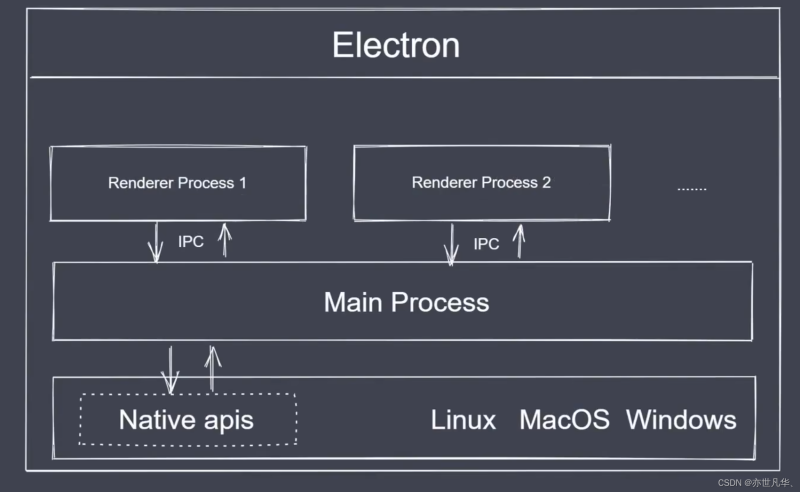
Electron 采用多进程架构,每个进程都有明确的职责:
| 进程类型 | 运行环境 | 职责 | 通信方式 |
|---|---|---|---|
| 主进程 (Main Process) | Node.js | 窗口管理、系统 API 调用、应用生命周期 | IPC |
| 渲染进程 (Renderer Process) | Chromium + Vue | 界面渲染、用户交互 | contextBridge |
| 预加载脚本 (Preload) | Node.js + Chromium | 安全桥接、API 暴露 | contextBridge |
| GPU 进程 | Chromium | 图形渲染加速 | IPC |
1.2 为什么需要多窗口?
┌─────────────────────────────────────────────────────────────┐
│                      主进程 (Main Process)                    │
│  ┌─────────────┐  ┌─────────────┐  ┌─────────────┐        │
│  │   窗口管理   │  │   系统 API   │  │  应用逻辑   │        │
│  └──────┬──────┘  └─────────────┘  └─────────────┘        │
│         │                                                      │
│    ┌────┴────┬────────────────┐                              │
│    │         │                │                              │
│    ▼         ▼                ▼                              │
│ ┌──────┐  ┌──────┐      ┌──────┐                            │
│ │主窗口│  │设置窗口│     │关于窗口│                            │
│ │(Vue) │  │(Vue)  │      │(纯HTML)│                           │
│ └──────┘  └──────┘      └──────┘                            │
└─────────────────────────────────────────────────────────────┘
多窗口适用场景:
| 场景 | 示例 |
|---|---|
| 主应用 + 设置面板 | GameBox 主界面 + 游戏设置窗口 |
| 主应用 + 弹窗 | 主界面 + 游戏详情弹窗 |
| 多文档界面 (MDI) | 同时打开多个游戏 |
| 独立工具窗口 | 下载管理器、公告栏 |
2. BrowserWindow 核心配置
2.1 基础创建
// src/main/windowManager.ts
import { BrowserWindow, screen } from 'electron'
import { join } from 'path'

export function createMainWindow(): BrowserWindow {
  const { width, height } = screen.getPrimaryDisplay().workAreaSize

  const mainWindow = new BrowserWindow({
    width: 1200,              // 窗口宽度
    height: 800,              // 窗口高度
    minWidth: 800,            // 最小宽度
    minHeight: 600,           // 最小高度
    x: Math.floor((width - 1200) / 2),  // 居中定位
    y: Math.floor((height - 800) / 2),
    show: false,              // 等待 ready-to-show 再显示
    title: 'GameBox',
    icon: join(__dirname, '../../build/icon.png'),
    webPreferences: {
      nodeIntegration: false,      // 禁用 Node.js 集成
      contextIsolation: true,       // 启用上下文隔离
      sandbox: true,               // 启用沙箱
      preload: join(__dirname, '../preload/index.js')
    }
  })

  // 窗口准备好后显示,避免白屏闪烁
  mainWindow.once('ready-to-show', () => {
    mainWindow.show()
  })

  return mainWindow
}
2.2 窗口状态持久化
// src/main/windowState.ts
import { app, BrowserWindow } from 'electron'
import * as fs from 'fs'
import * as path from 'path'

interface WindowState {
  x?: number
  y?: number
  width: number
  height: number
  isMaximized: boolean
}

export class WindowStateManager {
  private state: WindowState
  private stateFilePath: string
  private window: BrowserWindow | null = null

  constructor(windowName: string, defaults: Partial<WindowState> = {}) {
    this.stateFilePath = path.join(
      app.getPath('userData'),
      `window-state-${windowName}.json`
    )
    this.state = this.loadState(defaults)
  }

  private loadState(defaults: Partial<WindowState>): WindowState {
    const defaultState: WindowState = {
      width: 1200,
      height: 800,
      isMaximized: false,
      ...defaults
    }

    try {
      if (fs.existsSync(this.stateFilePath)) {
        const data = fs.readFileSync(this.stateFilePath, 'utf-8')
        return { ...defaultState, ...JSON.parse(data) }
      }
    } catch (error) {
      console.error('Failed to load window state:', error)
    }

    return defaultState
  }

  getState(): WindowState {
    return this.state
  }

  track(window: BrowserWindow): void {
    this.window = window

    const updateState = () => {
      if (!this.window || this.window.isDestroyed()) return

      const isMaximized = this.window.isMaximized()

      if (!isMaximized) {
        const bounds = this.window.getBounds()
        this.state = {
          ...this.state,
          x: bounds.x,
          y: bounds.y,
          width: bounds.width,
          height: bounds.height
        }
      }
      this.state.isMaximized = isMaximized
    }

    // 节流保存,避免频繁写入
    let saveTimeout: NodeJS.Timeout | null = null
    const saveState = () => {
      if (saveTimeout) clearTimeout(saveTimeout)
      saveTimeout = setTimeout(() => {
        try {
          fs.writeFileSync(
            this.stateFilePath,
            JSON.stringify(this.state),
            'utf-8'
          )
        } catch (error) {
          console.error('Failed to save window state:', error)
        }
      }, 500)
    }

    this.window.on('resize', updateState)
    this.window.on('move', updateState)
    this.window.on('maximize', updateState)
    this.window.on('unmaximize', updateState)
    this.window.on('close', saveState)
  }
}
2.3 窗口类型配置对照表
| 属性 | 类型 | 说明 | 可选值 |
|---|---|---|---|
width/height | number | 窗口尺寸 | 像素值 |
minWidth/minHeight | number | 最小尺寸限制 | 像素值 |
maxWidth/maxHeight | number | 最大尺寸限制 | 像素值 |
x/y | number | 窗口位置 | 屏幕坐标 |
frame | boolean | 是否显示窗口边框 | true / false |
titleBarStyle | string | 标题栏样式 | 'default', 'hidden', 'hiddenInset' |
transparent | boolean | 透明窗口背景 | true / false |
alwaysOnTop | boolean | 窗口置顶 | true / false |
skipTaskbar | boolean | 从任务栏隐藏 | true / false |
resizable | boolean | 是否可调整大小 | true / false |
movable | boolean | 是否可移动 | true / false |
closable | boolean | 是否可关闭 | true / false |
3. IPC 通信机制详解
3.1 IPC 通信流程
┌─────────────────────────────────────────────────────────────────┐
│                        渲染进程 (Renderer)                        │
│  ┌─────────────────────────────────────────────────────────┐    │
│  │                    window.electronAPI                     │    │
│  │  ┌─────────────────────────────────────────────────────┐│    │
│  │  │           contextBridge.exposeInMainWorld          ││    │
│  │  └─────────────────────────────────────────────────────┘│    │
│  └─────────────────────────────────────────────────────────┘    │
│                              │                                    │
│                              │ ipcRenderer.invoke()               │
└──────────────────────────────┼───────────────────────────────────┘
                               │
                    ┌──────────┴──────────┐
                    │      IPC 通道        │
                    │  (invoke/handle)     │
                    └──────────┬──────────┘
                               │
┌──────────────────────────────┼───────────────────────────────────┐
│                        主进程 (Main)                              │
│                              ▼                                    │
│  ┌─────────────────────────────────────────────────────────┐    │
│  │                    ipcMain.handle()                      │    │
│  │  ┌─────────────────────────────────────────────────────┐│    │
│  │  │                    业务逻辑                          ││    │
│  │  └─────────────────────────────────────────────────────┘│    │
│  └─────────────────────────────────────────────────────────┘    │
└───────────────────────────────────────────────────────────────────┘
3.2 预加载脚本配置
// src/preload/index.ts
import { contextBridge, ipcRenderer } from 'electron'

// 定义暴露给渲染进程的 API
const electronAPI = {
  // ============ 窗口管理 ============
  window: {
    minimize: () => ipcRenderer.invoke('window:minimize'),
    maximize: () => ipcRenderer.invoke('window:maximize'),
    close: () => ipcRenderer.invoke('window:close'),
    isMaximized: () => ipcRenderer.invoke('window:isMaximized'),
    openSettings: () => ipcRenderer.invoke('window:openSettings'),
    openAbout: () => ipcRenderer.invoke('window:openAbout'),
  },

  // ============ 游戏管理 ============
  games: {
    getList: () => ipcRenderer.invoke('games:getList'),
    getById: (id: string) => ipcRenderer.invoke('games:getById', id),
    launch: (id: string) => ipcRenderer.invoke('games:launch', id),
    toggleFavorite: (id: string) => ipcRenderer.invoke('games:toggleFavorite', id),
  },

  // ============ 系统信息 ============
  system: {
    getVersion: () => ipcRenderer.invoke('system:getVersion'),
    getPlatform: () => ipcRenderer.invoke('system:getPlatform'),
    getLocale: () => ipcRenderer.invoke('system:getLocale'),
  },

  // ============ 事件监听 ============
  on: (channel: string, callback: (...args: any[]) => void) => {
    const validChannels = [
      'update-status',
      'game-launched',
      'settings-changed',
      'window-maximized',
      'window-unmaximized'
    ]
    if (validChannels.includes(channel)) {
      ipcRenderer.on(channel, (_event, ...args) => callback(...args))
    }
  },

  off: (channel: string, callback: (...args: any[]) => void) => {
    ipcRenderer.removeListener(channel, callback)
  },

  removeAllListeners: (channel: string) => {
    ipcRenderer.removeAllListeners(channel)
  }
}

// 暴露到渲染进程的全局对象
contextBridge.exposeInMainWorld('electronAPI', electronAPI)

// 类型声明(供 TypeScript 使用)
export type ElectronAPI = typeof electronAPI
3.3 主进程 IPC 处理
// src/main/ipcHandlers.ts
import { ipcMain, app, BrowserWindow } from 'electron'
import { database } from './services/database'
import { gameLauncher } from './services/gameLauncher'

export function registerIpcHandlers(): void {
  // ============ 窗口管理 ============
  ipcMain.handle('window:minimize', (event) => {
    const win = BrowserWindow.fromWebContents(event.sender)
    win?.minimize()
  })

  ipcMain.handle('window:maximize', (event) => {
    const win = BrowserWindow.fromWebContents(event.sender)
    if (win?.isMaximized()) {
      win.unmaximize()
    } else {
      win?.maximize()
    }
  })

  ipcMain.handle('window:close', (event) => {
    const win = BrowserWindow.fromWebContents(event.sender)
    win?.close()
  })

  ipcMain.handle('window:isMaximized', (event) => {
    const win = BrowserWindow.fromWebContents(event.sender)
    return win?.isMaximized() ?? false
  })

  ipcMain.handle('window:openSettings', () => {
    const { createSettingsWindow } = require('./windowManager')
    createSettingsWindow()
  })

  ipcMain.handle('window:openAbout', () => {
    const { createAboutWindow } = require('./windowManager')
    createAboutWindow()
  })

  // ============ 游戏管理 ============
  ipcMain.handle('games:getList', async () => {
    try {
      return await database.query('SELECT * FROM games ORDER BY sort_order')
    } catch (error) {
      console.error('Failed to get games list:', error)
      return []
    }
  })

  ipcMain.handle('games:getById', async (_event, id: string) => {
    try {
      return await database.query(
        'SELECT * FROM games WHERE id = ?',
[id]
) } catch (error) { console.error(‘Failed to get game:’, error) return null } }) ipcMain.handle(‘games:launch’, async (event, id: string) => { try { const game = await database.query( ‘SELECT * FROM games WHERE id = ?’,
[id]
) if (!game) { throw new Error(‘Game not found’) } await gameLauncher.launch(game) // 通知所有窗口游戏已启动 BrowserWindow.getAllWindows().forEach(win => { win.webContents.send(‘game-launched’, { gameId: id }) }) return { success: true } } catch (error) { console.error(‘Failed to launch game:’, error) return { success: false, error: (error as Error).message } } }) ipcMain.handle(‘games:toggleFavorite’, async (_event, id: string) => { try { await database.run( ‘UPDATE games SET is_favorite = NOT is_favorite WHERE id = ?’,
[id]
) return { success: true } } catch (error) { console.error(‘Failed to toggle favorite:’, error) return { success: false } } }) // ============ 系统信息 ============ ipcMain.handle(‘system:getVersion’, () => app.getVersion()) ipcMain.handle(‘system:getPlatform’, () => process.platform) ipcMain.handle(‘system:getLocale’, () => app.getLocale()) }
4. 多窗口创建与管理
4.1 窗口管理器
// src/main/windowManager.ts
import {
  BrowserWindow,
  screen,
  app
} from 'electron'
import { join } from 'path'
import { is } from '@electron-toolkit/utils'
import { WindowStateManager } from './windowState'

// 窗口实例存储
const windows = new Map<string, BrowserWindow>()

// 主窗口
export function createMainWindow(): BrowserWindow {
  const stateManager = new WindowStateManager('main', {
    width: 1200,
    height: 800
  })
  const state = stateManager.getState()

  const mainWindow = new BrowserWindow({
    ...state,
    show: false,
    autoHideMenuBar: false,
    title: 'GameBox',
    webPreferences: {
      nodeIntegration: false,
      contextIsolation: true,
      sandbox: true,
      preload: join(__dirname, '../preload/index.js')
    }
  })

  stateManager.track(mainWindow)
  windows.set('main', mainWindow)

  // 加载页面
  if (is.dev && process.env['ELECTRON_RENDERER_URL']) {
    mainWindow.loadURL(process.env['ELECTRON_RENDERER_URL'])
  } else {
    mainWindow.loadFile(join(__dirname, '../renderer/index.html'))
  }

  mainWindow.on('closed', () => {
    windows.delete('main')
  })

  return mainWindow
}

// 设置窗口
export function createSettingsWindow(): BrowserWindow {
  // 如果已存在则聚焦
  const existingWindow = windows.get('settings')
  if (existingWindow && !existingWindow.isDestroyed()) {
    existingWindow.focus()
    return existingWindow
  }

  const settingsWindow = new BrowserWindow({
    width: 600,
    height: 500,
    resizable: false,
    minimizable: true,
    maximizable: false,
    parent: windows.get('main') ?? undefined,  // 模态窗口,锁定主窗口
    modal: true,
    show: false,
    title: '设置',
    webPreferences: {
      nodeIntegration: false,
      contextIsolation: true,
      sandbox: true,
      preload: join(__dirname, '../preload/index.js')
    }
  })

  windows.set('settings', settingsWindow)

  // 加载设置页面
  if (is.dev && process.env['ELECTRON_RENDERER_URL']) {
    settingsWindow.loadURL(`${process.env['ELECTRON_RENDERER_URL']}#/settings`)
  } else {
    settingsWindow.loadFile(join(__dirname, '../renderer/index.html'), {
      hash: '/settings'
    })
  }

  settingsWindow.once('ready-to-show', () => {
    settingsWindow.show()
  })

  settingsWindow.on('closed', () => {
    windows.delete('settings')
  })

  return settingsWindow
}

// 关于窗口
export function createAboutWindow(): BrowserWindow {
  const existingWindow = windows.get('about')
  if (existingWindow && !existingWindow.isDestroyed()) {
    existingWindow.focus()
    return existingWindow
  }

  const aboutWindow = new BrowserWindow({
    width: 400,
    height: 300,
    resizable: false,
    minimizable: false,
    maximizable: false,
    fullscreenable: false,
    alwaysOnTop: true,
    center: true,
    show: false,
    title: '关于 GameBox',
    frame: false,  // 无边框窗口
    webPreferences: {
      nodeIntegration: false,
      contextIsolation: true,
      sandbox: true,
      preload: join(__dirname, '../preload/index.js')
    }
  })

  windows.set('about', aboutWindow)

  if (is.dev && process.env['ELECTRON_RENDERER_URL']) {
    aboutWindow.loadURL(`${process.env['ELECTRON_RENDERER_URL']}#/about`)
  } else {
    aboutWindow.loadFile(join(__dirname, '../renderer/index.html'), {
      hash: '/about'
    })
  }

  aboutWindow.once('ready-to-show', () => {
    aboutWindow.show()
  })

  aboutWindow.on('closed', () => {
    windows.delete('about')
  })

  return aboutWindow
}

// 游戏详情窗口(可创建多个)
export function createGameDetailWindow(gameId: string): BrowserWindow {
  const { width, height } = screen.getPrimaryDisplay().workAreaSize

  const gameWindow = new BrowserWindow({
    width: 900,
    height: 700,
    minWidth: 700,
    minHeight: 500,
    x: Math.floor((width - 900) / 2),
    y: Math.floor((height - 700) / 2),
    show: false,
    title: '游戏详情',
    webPreferences: {
      nodeIntegration: false,
      contextIsolation: true,
      sandbox: true,
      preload: join(__dirname, '../preload/index.js')
    }
  })

  windows.set(`game-${gameId}`, gameWindow)

  if (is.dev && process.env['ELECTRON_RENDERER_URL']) {
    gameWindow.loadURL(`${process.env['ELECTRON_RENDERER_URL']}#/game/${gameId}`)
  } else {
    gameWindow.loadFile(join(__dirname, '../renderer/index.html'), {
      hash: `/game/${gameId}`
    })
  }

  gameWindow.once('ready-to-show', () => {
    gameWindow.show()
  })

  gameWindow.on('closed', () => {
    windows.delete(`game-${gameId}`)
  })

  return gameWindow
}

// 获取所有窗口
export function getAllWindows(): BrowserWindow[] {
  return Array.from(windows.values()).filter(win => !win.isDestroyed())
}

// 获取指定窗口
export function getWindow(name: string): BrowserWindow | undefined {
  const win = windows.get(name)
  return win?.isDestroyed() ? undefined : win
}
4.2 主进程入口
// src/main/index.ts
import { app, BrowserWindow, Menu } from 'electron'
import { createMainWindow } from './windowManager'
import { registerIpcHandlers } from './ipcHandlers'
import { database } from './services/database'
import { setupAutoUpdater } from './services/autoUpdater'

// 单例锁,确保只有一个实例运行
const gotTheLock = app.requestSingleInstanceLock()

if (!gotTheLock) {
  app.quit()
} else {
  app.on('second-instance', () => {
    // 聚焦主窗口(如果有其他实例尝试启动)
    const mainWindow = BrowserWindow.getAllWindows()[0]
    if (mainWindow) {
      if (mainWindow.isMinimized()) mainWindow.restore()
      mainWindow.focus()
    }
  })

  app.whenReady().then(async () => {
    // 初始化数据库
    await database.initialize()

    // 注册 IPC 处理器
    registerIpcHandlers()

    // 创建主窗口
    createMainWindow()

    // 设置自动更新
    setupAutoUpdater()

    // 创建应用菜单
    createAppMenu()

    app.on('activate', () => {
      if (BrowserWindow.getAllWindows().length === 0) {
        createMainWindow()
      }
    })
  })

  app.on('window-all-closed', () => {
    if (process.platform !== 'darwin') {
      app.quit()
    }
  })
}

function createAppMenu(): void {
  const template: Electron.MenuItemConstructorOptions[] = [
    {
      label: '文件',
      submenu: [
        {
          label: '设置',
          accelerator: 'CmdOrCtrl+,',
          click: () => {
            const { createSettingsWindow } = require('./windowManager')
            createSettingsWindow()
          }
        },
        { type: 'separator' },
        { role: 'quit' }
      ]
    },
    {
      label: '编辑',
      submenu: [
        { role: 'undo' },
        { role: 'redo' },
        { type: 'separator' },
        { role: 'cut' },
        { role: 'copy' },
        { role: 'paste' },
        { role: 'selectAll' }
      ]
    },
    {
      label: '视图',
      submenu: [
        { role: 'reload' },
        { role: 'forceReload' },
        { role: 'toggleDevTools' },
        { type: 'separator' },
        { role: 'resetZoom' },
        { role: 'zoomIn' },
        { role: 'zoomOut' },
        { type: 'separator' },
        { role: 'togglefullscreen' }
      ]
    },
    {
      label: '窗口',
      submenu: [
        { role: 'minimize' },
        { role: 'zoom' },
        { type: 'separator' },
        { role: 'close' }
      ]
    },
    {
      label: '帮助',
      submenu: [
        {
          label: '关于 GameBox',
          click: () => {
            const { createAboutWindow } = require('./windowManager')
            createAboutWindow()
          }
        }
      ]
    }
  ]

  const menu = Menu.buildFromTemplate(template)
  Menu.setApplicationMenu(menu)
}
5. 窗口间通信
5.1 主进程作为消息总线
// src/main/windowManager.ts 扩展 - 窗口间通信

// 窗口间消息传递
export function sendToWindow(senderName: string, targetName: string, channel: string, data: any): void {
  const sender = windows.get(senderName)
  const target = windows.get(targetName)

  if (!sender || sender.isDestroyed()) {
    console.warn(`Sender window '${senderName}' not found or destroyed`)
    return
  }

  if (!target || target.isDestroyed()) {
    console.warn(`Target window '${targetName}' not found or destroyed`)
    return
  }

  target.webContents.send(`window-message:${channel}`, {
    from: senderName,
    data
  })
}

// 广播到所有窗口
export function broadcastToAllWindows(channel: string, data: any): void {
  windows.forEach((win, name) => {
    if (!win.isDestroyed()) {
      win.webContents.send(`window-message:${channel}`, {
        from: 'broadcast',
        data
      })
    }
  })
}

// 向所有窗口广播(主进程事件)
export function broadcastMainEvent(channel: string, data: any): void {
  BrowserWindow.getAllWindows().forEach(win => {
    win.webContents.send(channel, data)
  })
}
5.2 渲染进程消息监听
// src/renderer/composables/useWindowCommunication.ts
import { onMounted, onUnmounted } from 'vue'

export function useWindowCommunication() {
  const messageHandlers = new Map<string, Set<Function>>()

  // 监听窗口消息
  const onWindowMessage = (channel: string, callback: (data: any) => void) => {
    const handler = (_event: any, data: any) => callback(data)

    if (!messageHandlers.has(channel)) {
      messageHandlers.set(channel, new Set())
    }
    messageHandlers.get(channel)!.add(handler)

    window.electronAPI.on(`window-message:${channel}`, handler)
  }

  // 移除监听
  const offWindowMessage = (channel: string, callback?: Function) => {
    const handlers = messageHandlers.get(channel)
    if (handlers && callback) {
      handlers.delete(callback)
      window.electronAPI.off(`window-message:${channel}`, callback)
    } else if (handlers) {
      handlers.forEach(handler => {
        window.electronAPI.off(`window-message:${channel}`, handler)
      })
      handlers.clear()
    }
  }

  // 清理所有监听
  onUnmounted(() => {
    messageHandlers.forEach((handlers, channel) => {
      handlers.forEach(handler => {
        window.electronAPI.off(`window-message:${channel}`, handler)
      })
    })
    messageHandlers.clear()
  })

  return {
    onWindowMessage,
    offWindowMessage
  }
}
5.3 父子窗口数据同步
// src/renderer/stores/settingsStore.ts
import { defineStore } from 'pinia'
import { ref, watch } from 'vue'

export const useSettingsStore = defineStore('settings', () => {
  const settings = ref({
    theme: 'dark',
    language: 'zh-CN',
    autoLaunch: false,
    minimizeToTray: true,
    gamePaths: [] as string[]
  })

  // 监听设置变化,同步到其他窗口
  watch(settings, async (newSettings) => {
    // 保存到本地存储
    localStorage.setItem('gamebox-settings', JSON.stringify(newSettings))

    // 通知主进程
    await window.electronAPI.settings?.update(newSettings)
  }, { deep: true })

  // 加载设置
  async function loadSettings() {
    const saved = localStorage.getItem('gamebox-settings')
    if (saved) {
      try {
        const parsed = JSON.parse(saved)
        settings.value = { ...settings.value, ...parsed }
      } catch (e) {
        console.error('Failed to parse settings:', e)
      }
    }
  }

  return {
    settings,
    loadSettings
  }
})
6. 实战:GameBox 多窗口实现
6.1 整体架构
┌─────────────────────────────────────────────────────────────────────┐
│                            GameBox 应用                              │
├─────────────────────────────────────────────────────────────────────┤
│                                                                      │
│  ┌─────────────────────────────────────────────────────────────┐   │
│  │                      主窗口 (main)                            │   │
│  │  ┌─────────┐ ┌─────────┐ ┌─────────┐ ┌─────────┐          │   │
│  │  │游戏分类  │ │专题推荐  │ │我的收藏  │ │最近游戏  │          │   │
│  │  └─────────┘ └─────────┘ └─────────┘ └─────────┘          │   │
│  │  ┌─────────────────────────────────────────────────────┐   │   │
│  │  │                    游戏列表                           │   │   │
│  │  │  ┌───────┐ ┌───────┐ ┌───────┐ ┌───────┐            │   │   │
│  │  │  │ 游戏1 │ │ 游戏2 │ │ 游戏3 │ │ 游戏4 │            │   │   │
│  │  │  └───────┘ └───────┘ └───────┘ └───────┘            │   │   │
│  │  └─────────────────────────────────────────────────────┘   │   │
│  └─────────────────────────────────────────────────────────────┘   │
│                                                                      │
│  ┌──────────────────┐                        ┌──────────────────┐   │
│  │  设置窗口 (settings) │◄─── 模态 ───►│   关于窗口 (about)   │   │
│  │  • 主题设置        │                │   • 版本信息        │   │
│  │  • 游戏路径        │                │   • 许可证          │   │
│  │  • 自动启动        │                └──────────────────┘   │
│  │  • 快捷键配置      │                                            │
│  └──────────────────┘                                            │
│                                                                      │
│  ┌─────────────────────────────────────────────────────────────┐   │
│  │                    游戏详情窗口 (game-{id})                   │   │
│  │  • 游戏截图        • 评分      • 开始游戏                     │   │
│  │  • 游戏介绍        • 评论      • 加入收藏                     │   │
│  └─────────────────────────────────────────────────────────────┘   │
│                                                                      │
└─────────────────────────────────────────────────────────────────────┘
6.2 Vue 组件实现
6.2.1 主窗口 App.vue
<!-- src/renderer/src/App.vue -->
<template>
  <div class="app" :class="{ 'is-maximized': isMaximized }">
    <!-- 自定义标题栏 -->
    <TitleBar
      :is-maximized="isMaximized"
      @minimize="handleMinimize"
      @maximize="handleMaximize"
      @close="handleClose"
    />

    <!-- 主内容区 -->
    <main class="main-content">
      <Sidebar />
      <router-view v-slot="{ Component }">
        <transition name="fade" mode="out-in">
          <component :is="Component" />
        </transition>
      </router-view>
    </main>
  </div>
</template>

<script setup lang="ts">
import { ref, onMounted, onUnmounted } from 'vue'
import { useRouter } from 'vue-router'
import TitleBar from '@/components/TitleBar.vue'
import Sidebar from '@/components/Sidebar.vue'
import { useSettingsStore } from '@/stores/settingsStore'

const router = useRouter()
const settingsStore = useSettingsStore()
const isMaximized = ref(false)

// 监听最大化状态变化
const handleMaximizedChange = (maximized: boolean) => {
  isMaximized.value = maximized
}

onMounted(async () => {
  // 加载设置
  await settingsStore.loadSettings()

  // 监听窗口最大化状态
  window.electronAPI?.on?.('window-maximized', () => handleMaximizedChange(true))
  window.electronAPI?.on?.('window-unmaximized', () => handleMaximizedChange(false))

  // 获取初始状态
  isMaximized.value = await window.electronAPI?.window?.isMaximized?.() ?? false
})

onUnmounted(() => {
  window.electronAPI?.removeAllListeners?.('window-maximized')
  window.electronAPI?.removeAllListeners?.('window-unmaximized')
})

// 窗口控制
const handleMinimize = () => window.electronAPI?.window?.minimize?.()
const handleMaximize = () => window.electronAPI?.window?.maximize?.()
const handleClose = () => window.electronAPI?.window?.close?.()
</script>

<style scoped>
.app {
  display: flex;
  flex-direction: column;
  height: 100vh;
  background: var(--bg-primary);
  overflow: hidden;
}

.main-content {
  display: flex;
  flex: 1;
  overflow: hidden;
}

.fade-enter-active,
.fade-leave-active {
  transition: opacity 0.2s ease;
}

.fade-enter-from,
.fade-leave-to {
  opacity: 0;
}
</style>
6.2.2 游戏卡片组件
<!-- src/renderer/src/components/GameCard.vue -->
<template>
  <div class="game-card" @click="openGameDetail">
    <div class="game-cover">
      <img :src="game.coverImage" :alt="game.name" />
      <div class="game-overlay">
        <button class="play-btn" @click.stop="launchGame">
          <svg viewBox="0 0 24 24"><path d="M8 5v14l11-7z"/></svg>
          开始游戏
        </button>
      </div>
    </div>
    <div class="game-info">
      <h3 class="game-name">{{ game.name }}</h3>
      <div class="game-meta">
        <span class="game-category">{{ game.category }}</span>
        <button
          class="favorite-btn"
          :class="{ 'is-favorite': game.isFavorite }"
          @click.stop="toggleFavorite"
        >
          {{ game.isFavorite ? '❤️' : '🤍' }}
        </button>
      </div>
    </div>
  </div>
</template>

<script setup lang="ts">
import { defineProps, defineEmits } from 'vue'

interface Game {
  id: string
  name: string
  coverImage: string
  category: string
  isFavorite: boolean
}

const props = defineProps<{ game: Game }>()
const emit = defineEmits(['launch', 'toggleFavorite', 'openDetail'])

const launchGame = async () => {
  const result = await window.electronAPI?.games?.launch?.(props.game.id)
  if (result?.success) {
    emit('launch', props.game.id)
  }
}

const toggleFavorite = async () => {
  await window.electronAPI?.games?.toggleFavorite?.(props.game.id)
  emit('toggleFavorite', props.game.id)
}

const openGameDetail = () => {
  emit('openDetail', props.game.id)
}
</script>
6.2.3 设置窗口组件
<!-- src/renderer/src/views/SettingsView.vue -->
<template>
  <div class="settings-view">
    <header class="settings-header">
      <h1>设置</h1>
      <button class="close-btn" @click="closeWindow">×</button>
    </header>

    <main class="settings-content">
      <!-- 主题设置 -->
      <section class="settings-section">
        <h2>外观</h2>
        <div class="setting-item">
          <label>主题</label>
          <select v-model="settings.theme">
            <option value="dark">深色</option>
            <option value="light">浅色</option>
            <option value="system">跟随系统</option>
          </select>
        </div>
        <div class="setting-item">
          <label>语言</label>
          <select v-model="settings.language">
            <option value="zh-CN">简体中文</option>
            <option value="en-US">English</option>
          </select>
        </div>
      </section>

      <!-- 游戏设置 -->
      <section class="settings-section">
        <h2>游戏</h2>
        <div class="setting-item">
          <label>游戏库路径</label>
          <div class="path-input">
            <input
              type="text"
              v-model="gamePathsText"
              placeholder="选择游戏目录"
              readonly
            />
            <button @click="selectGamePath">浏览</button>
          </div>
        </div>
        <div class="setting-item toggle">
          <label>启动游戏时最小化</label>
          <input type="checkbox" v-model="settings.minimizeOnLaunch" />
        </div>
      </section>

      <!-- 系统设置 -->
      <section class="settings-section">
        <h2>系统</h2>
        <div class="setting-item toggle">
          <label>开机自启</label>
          <input type="checkbox" v-model="settings.autoLaunch" />
        </div>
        <div class="setting-item toggle">
          <label>最小化到托盘</label>
          <input type="checkbox" v-model="settings.minimizeToTray" />
        </div>
      </section>
    </main>

    <footer class="settings-footer">
      <button class="btn-secondary" @click="resetToDefaults">恢复默认</button>
      <button class="btn-primary" @click="saveSettings">保存</button>
    </footer>
  </div>
</template>

<script setup lang="ts">
import { ref, reactive, onMounted } from 'vue'

const settings = reactive({
  theme: 'dark',
  language: 'zh-CN',
  autoLaunch: false,
  minimizeToTray: true,
  minimizeOnLaunch: false,
  gamePaths: [] as string[]
})

const gamePathsText = ref('')

onMounted(() => {
  // 从主进程加载设置
  loadSettings()
})

const loadSettings = async () => {
  const saved = localStorage.getItem('gamebox-settings')
  if (saved) {
    try {
      const parsed = JSON.parse(saved)
      Object.assign(settings, parsed)
      gamePathsText.value = settings.gamePaths.join(', ')
    } catch (e) {
      console.error('Failed to load settings:', e)
    }
  }
}

const selectGamePath = async () => {
  // 通过 IPC 让主进程打开文件选择对话框
  const paths = await window.electronAPI?.system?.selectFolder?.()
  if (paths && paths.length > 0) {
    settings.gamePaths = [...new Set([...settings.gamePaths, ...paths])]
    gamePathsText.value = settings.gamePaths.join(', ')
  }
}

const saveSettings = async () => {
  localStorage.setItem('gamebox-settings', JSON.stringify(settings))
  await window.electronAPI?.settings?.update?.(settings)
  closeWindow()
}

const resetToDefaults = () => {
  Object.assign(settings, {
    theme: 'dark',
    language: 'zh-CN',
    autoLaunch: false,
    minimizeToTray: true,
    minimizeOnLaunch: false,
    gamePaths: []
  })
  gamePathsText.value = ''
}

const closeWindow = () => {
  window.electronAPI?.window?.close?.()
}
</script>

<style scoped>
.settings-view {
  display: flex;
  flex-direction: column;
  height: 100vh;
  background: var(--bg-primary);
}

.settings-header {
  display: flex;
  justify-content: space-between;
  align-items: center;
  padding: 16px 20px;
  background: var(--bg-secondary);
  -webkit-app-region: drag;
}

.close-btn {
  -webkit-app-region: no-drag;
  background: none;
  border: none;
  font-size: 24px;
  cursor: pointer;
  color: var(--text-secondary);
}

.settings-content {
  flex: 1;
  overflow-y: auto;
  padding: 20px;
}

.settings-section {
  margin-bottom: 24px;
}

.settings-section h2 {
  font-size: 14px;
  color: var(--text-secondary);
  margin-bottom: 12px;
}

.setting-item {
  display: flex;
  justify-content: space-between;
  align-items: center;
  padding: 12px 0;
  border-bottom: 1px solid var(--border-color);
}

.setting-item.toggle {
  justify-content: space-between;
}

.setting-item label {
  font-size: 14px;
}

.setting-item select,
.setting-item input[type="text"] {
  padding: 6px 12px;
  border: 1px solid var(--border-color);
  border-radius: 4px;
  background: var(--bg-secondary);
  color: var(--text-primary);
}

.settings-footer {
  display: flex;
  justify-content: flex-end;
  gap: 12px;
  padding: 16px 20px;
  background: var(--bg-secondary);
}
</style>
6.3 路由配置
// src/renderer/src/router/index.ts
import { createRouter, createWebHashHistory, RouteRecordRaw } from 'vue-router'

const routes: RouteRecordRaw[] = [
  {
    path: '/',
    name: 'home',
    component: () => import('@/views/HomeView.vue'),
    children: [
      { path: '', redirect: '/games' },
      { path: 'games', name: 'games', component: () => import('@/views/GamesView.vue') },
      { path: 'categories/:category', name: 'category', component: () => import('@/views/CategoryView.vue') },
      { path: 'favorites', name: 'favorites', component: () => import('@/views/FavoritesView.vue') },
      { path: 'recent', name: 'recent', component: () => import('@/views/RecentView.vue') }
    ]
  },
  {
    path: '/game/:id',
    name: 'game-detail',
    component: () => import('@/views/GameDetailView.vue')
  },
  {
    path: '/settings',
    name: 'settings',
    component: () => import('@/views/SettingsView.vue')
  },
  {
    path: '/about',
    name: 'about',
    component: () => import('@/views/AboutView.vue')
  }
]

const router = createRouter({
  history: createWebHashHistory(),
  routes
})

export default router
7. 安全最佳实践
7.1 上下文隔离与沙箱
// ✅ 正确配置
webPreferences: {
  nodeIntegration: false,      // 禁用 Node.js
  contextIsolation: true,       // 启用上下文隔离
  sandbox: true,                // 启用沙箱
  webSecurity: true,            // 启用 Web 安全
  allowRunningInsecureContent: false  // 禁止加载不安全内容
}

// ❌ 危险配置 - 不要使用
webPreferences: {
  nodeIntegration: true,        // 危险!
  contextIsolation: false        // 危险!
}
7.2 IPC 安全验证
// src/main/ipcHandlers.ts
import { ipcMain, webContents, session } from 'electron'

// 验证请求来源
ipcMain.handle('games:launch', async (event, gameId: string) => {
  // 验证 webContents 来源
  const validContents = webContents.fromId(event.sender.id)
  if (!validContents) {
    console.error('Invalid sender')
    return { success: false, error: 'Invalid request' }
  }

  // 验证游戏 ID 格式
  if (!/^[a-zA-Z0-9-]+$/.test(gameId)) {
    return { success: false, error: 'Invalid game ID' }
  }

  // 业务逻辑...
  return { success: true }
})

// 限制可访问的协议
session.defaultSession.webRequest.onBeforeRequest((details, callback) => {
  const allowedProtocols = ['https:', 'http:', 'file:']
  const url = new URL(details.url)

  if (!allowedProtocols.includes(url.protocol)) {
    callback({ cancel: true })
    return
  }

  callback({ cancel: false })
})
7.3 CSP 内容安全策略
// src/main/index.ts
app.whenReady().then(() => {
  session.defaultSession.webRequest.onHeadersReceived((details, callback) => {
    callback({
      responseHeaders: {
        ...details.responseHeaders,
        'Content-Security-Policy': [
          "default-src 'self';",
          "script-src 'self';",
          "style-src 'self' 'unsafe-inline';",
          "img-src 'self' data: https:;",
          "font-src 'self' data:;",
          "connect-src 'self' https://api.gamebox.com;"
        ].join(' ')
      }
    })
  })
})
8. 排错指南
8.1 常见问题与解决方案
| 问题 | 原因 | 解决方案 |
|---|---|---|
| 窗口白屏 | 页面加载路径错误 | 检查 loadFile/loadURL 路径;启用 DevTools 调试 |
| IPC 无响应 | contextBridge 未正确配置 | 确认 preload 脚本路径正确;检查 exposeInMainWorld 调用 |
| 窗口无法关闭 | 事件监听未正确移除 | 在 closed 事件中清理监听器 |
| 模态窗口背景锁定 | parent 设置错误 | 模态窗口必须设置 parent,且不能是自身 |
| 多显示器位置错误 | 窗口坐标超出屏幕 | 使用 screen.getAllDisplays() 检查屏幕边界 |
| 预加载脚本报错 | 路径使用 __dirname 问题 | 使用 app.getAppPath() 或 @electron-toolkit/utils |
8.2 调试技巧
// 启用详细日志
process.env.ELECTRON_ENABLE_LOGGING = 'true'

// 主进程日志
console.log('[Main] Window created:', windowId)

// 渲染进程日志
window.electronAPI.on('log', (message) => {
  console.log('[Renderer]', message)
})

// IPC 调试中间件
ipcMain.on('log', (_event, { level, message }) => {
  console[level]?.(`[IPC] ${message}`)
})
8.3 典型错误代码
// ❌ 错误1:忘记设置 contextBridge
// preload.ts
contextBridge.exposeInMainWorld('electronAPI', {
  // ...
}) // 忘记这行

// ❌ 错误2:窗口被垃圾回收
let mainWindow = new BrowserWindow({...})
mainWindow = null  // 窗口被关闭但引用丢失

// ✅ 正确做法:使用模块级变量或 Map 存储
const windows = new Map<string, BrowserWindow>()
windows.set('main', new BrowserWindow({...}))

// ❌ 错误3:在渲染进程直接使用 Node.js
// renderer.js
const fs = require('fs')  // 报错:contextIsolation 下不可用

// ✅ 正确做法:通过 IPC 调用
const result = await window.electronAPI.file.read('path/to/file')

// ❌ 错误4:预加载脚本中使用 ESM
// preload.mjs - Electron 不支持 ESM preload
import { contextBridge } from 'electron'

// ✅ 正确做法:使用 CommonJS
const { contextBridge } = require('electron')
9. 性能优化建议
9.1 窗口资源管理
// ✅ 及时销毁窗口
gameWindow.on('closed', () => {
  // 清理关联资源
  gameWindow.webContents.session?.clearCache()
})

// ✅ 延迟加载非关键窗口
const createSettingsWindow = () => {
  if (settingsWindow && !settingsWindow.isDestroyed()) {
    settingsWindow.focus()
    return
  }
  // 延迟创建
  setTimeout(() => {
    settingsWindow = new BrowserWindow({...})
  }, 100)
}

// ✅ 窗口失焦时释放资源
mainWindow.on('blur', () => {
  if (!mainWindow.webContents.isDevToolsOpened()) {
    mainWindow.webContents.executeJavaScript(`
      // 暂停非必要的动画和计时器
      document.querySelectorAll('video, audio').forEach(el => el.pause())
    `)
  }
})
9.2 内存优化
| 优化项 | 实现方式 |
|---|---|
| 窗口池 | 复用已关闭的窗口实例而非创建新实例 |
| 懒加载 | 非关键窗口延迟到需要时再创建 |
| 资源释放 | 窗口关闭时清理 CDN 缓存、大图内存 |
| 进程限制 | 限制最大并发窗口数量(建议 ≤5) |
// 窗口池实现示例
class WindowPool {
  private pool: BrowserWindow[] = []
  private maxSize = 3

  acquire(options: BrowserWindowConstructorOptions): BrowserWindow {
    if (this.pool.length > 0) {
      const window = this.pool.pop()!
      window.restore()
      return window
    }
    return new BrowserWindow(options)
  }

  release(window: BrowserWindow): void {
    if (this.pool.length < this.maxSize) {
      window.hide()
      this.pool.push(window)
    } else {
      window.destroy()
    }
  }
}
9.3 渲染进程优化
// 渲染进程:使用 requestIdleCallback 进行非紧急更新
const updateUI = () => {
  // 立即更新关键内容
  updateCriticalContent()

  // 非关键内容延迟更新
  requestIdleCallback(() => {
    updateNonCriticalContent()
  })
}

// 使用 Intersection Observer 延迟加载不可见内容
const observer = new IntersectionObserver((entries) => {
  entries.forEach(entry => {
    if (entry.isIntersecting) {
      loadImage(entry.target)
      observer.unobserve(entry.target)
    }
  })
}, { rootMargin: '100px' })
总结
本文详细讲解了 Electron 多窗口与进程通信的核心知识:
| 模块 | 关键点 |
|---|---|
| 多窗口架构 | 主进程管理所有窗口生命周期,BrowserWindow 提供丰富的配置选项 |
| IPC 通信 | 通过 contextBridge 安全桥接,invoke/handle 模式处理异步请求 |
| 窗口管理 | 窗口状态持久化、窗口池、父子窗口关系 |
| 安全 | 始终启用 contextIsolation 和 sandbox,验证 IPC 来源 |
| 性能 | 懒加载窗口、及时释放资源、限制并发数量 |
结合 GameBox 项目实践,我们实现了:
- 主窗口:游戏浏览和启动
- 设置窗口:应用配置(模态)
- 关于窗口:版本信息(无边框)
- 游戏详情窗口:可多开的游戏详情




暂无评论内容